

Steam Inventory Helper for CS2 & more: skins, prices and trades.
Track Steam inventory value, CS2 skin prices, float data, market listings and trade offers directly on Steam with SteamHelper. Built for Chrome, Edge, Brave, Firefox and other Chromium browsers.
Pick your browser. Edge uses the Chrome Web Store version.
SteamHelper is live for Chrome-compatible browsers and Firefox. Edge users can install the same Chrome Web Store build directly in Microsoft Edge.
Google Chrome
Install the official SteamHelper build from the Chrome Web Store.

Microsoft Edge
Open the Chrome Web Store in Edge and add SteamHelper from there.

Mozilla Firefox
Use the dedicated Mozilla Add-ons listing for Firefox.
Brave Browser
Brave supports Chrome Web Store extensions, so the Chrome build is ready.
Chromium browsers
For Chromium-based browsers, use the Chrome Web Store listing.
Set up in seconds, useful right away.
No account, no configuration — SteamHelper starts working the moment it's installed.
Add the extension
Install SteamHelper from the Chrome Web Store in a few seconds. No account and no setup needed to get started.
Open Steam like you always do
Inventory value, price badges and market comparisons appear directly on Steam Community pages — no extra tabs, no dashboard to open.
See what's fair, then decide
Check prices, review trade offers and list items with a suggested price you can adjust. You approve every action before it happens.
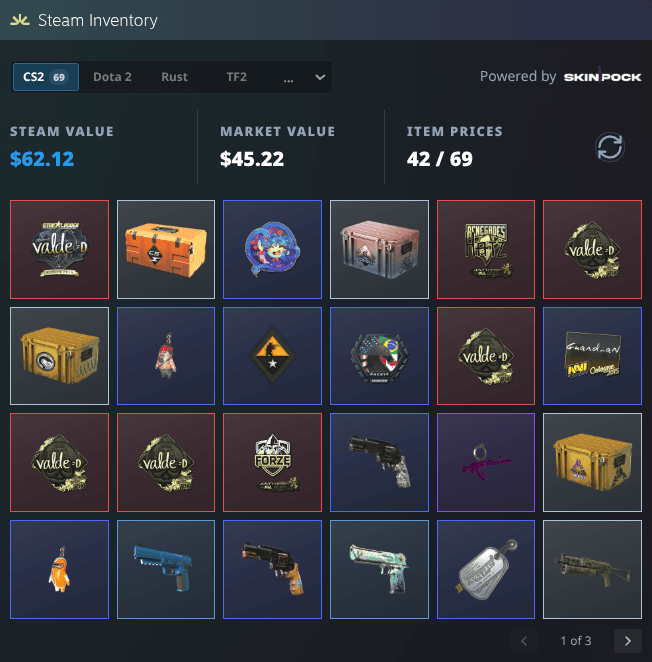
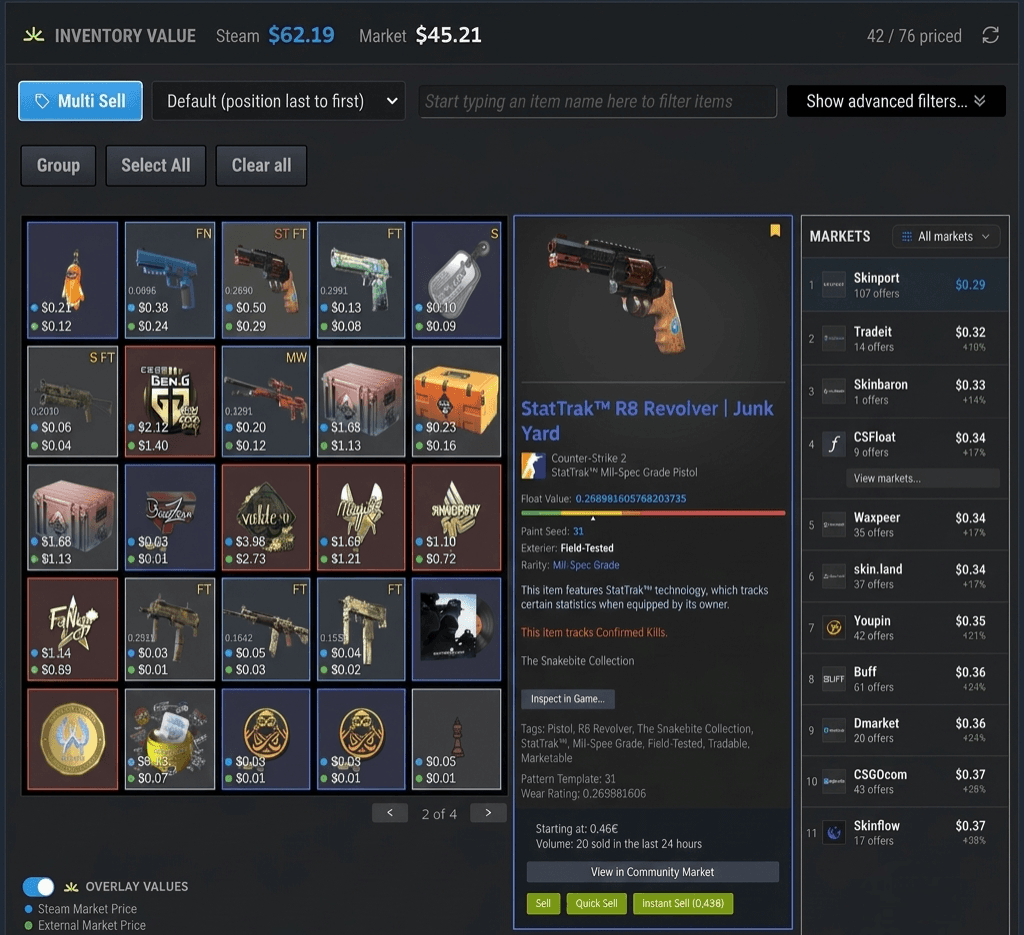
Open a Steam profile. See what the inventory is worth.
On Steam profile and inventory pages, SteamHelper adds a Steam Inventory Helper panel — Steam value next to real market value, how many CS2 items are priced, and the full item grid. No dashboard to open.
- Two totals at a glance: Steam's reference value and the real market value of the whole inventory.
- A clear priced count — 42 of 69 — so you always know how complete the value is.
- Switch between your Steam games to browse every item in one simple grid — with live value totals.
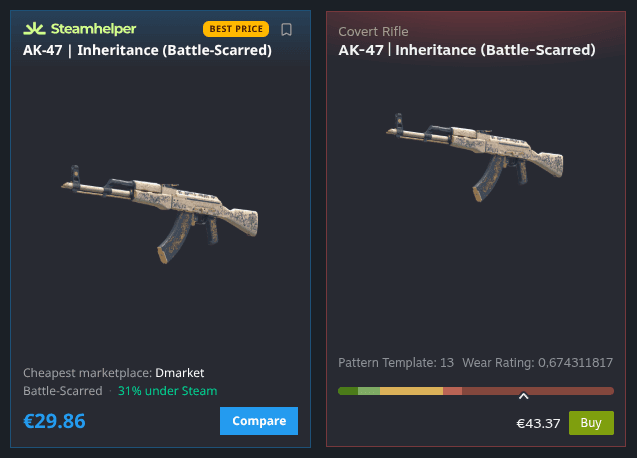
See the cheapest place to buy — right next to Steam.
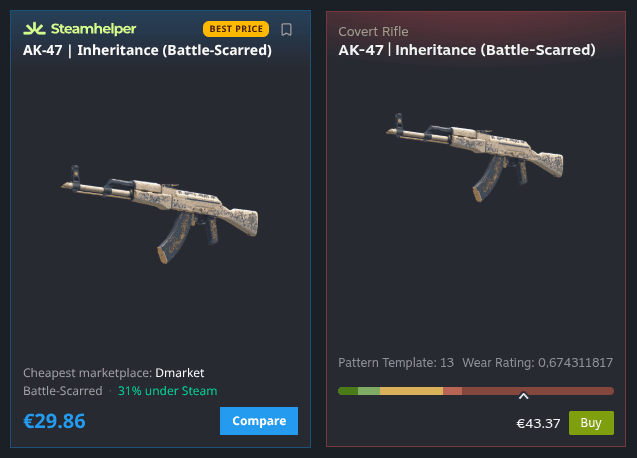
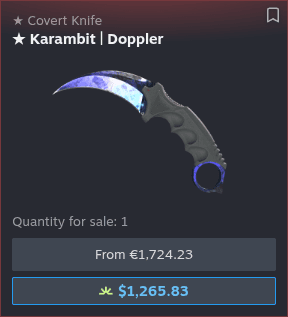
Open any skin on Steam and SteamHelper adds a compact card with the lowest price across trusted marketplaces, plus how much it beats Steam. No tab-hopping, no guessing — just the better deal, side by side.
- Shows exactly how much cheaper than Steam
- Names the cheapest marketplace for each item
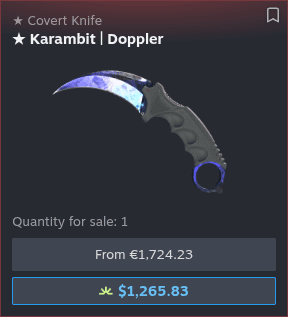
Steam's price isn't always the real price.
Steam only shows its own starting price. SteamHelper puts the true lowest market price right beneath it, so the gap is impossible to miss — especially on knives, gloves and other high-value skins where it can be hundreds.
- The lowest market price, right under Steam's
- Big differences on pricey items, at a glance

Compare every wear before you commit.
From Factory New to Battle-Scarred, SteamHelper lines up each condition with its lowest market price next to Steam's. You can see at a glance which wear is actually worth it — instead of paying more for a label.
- All five conditions, priced side by side
- Spot the wear that's actually worth it
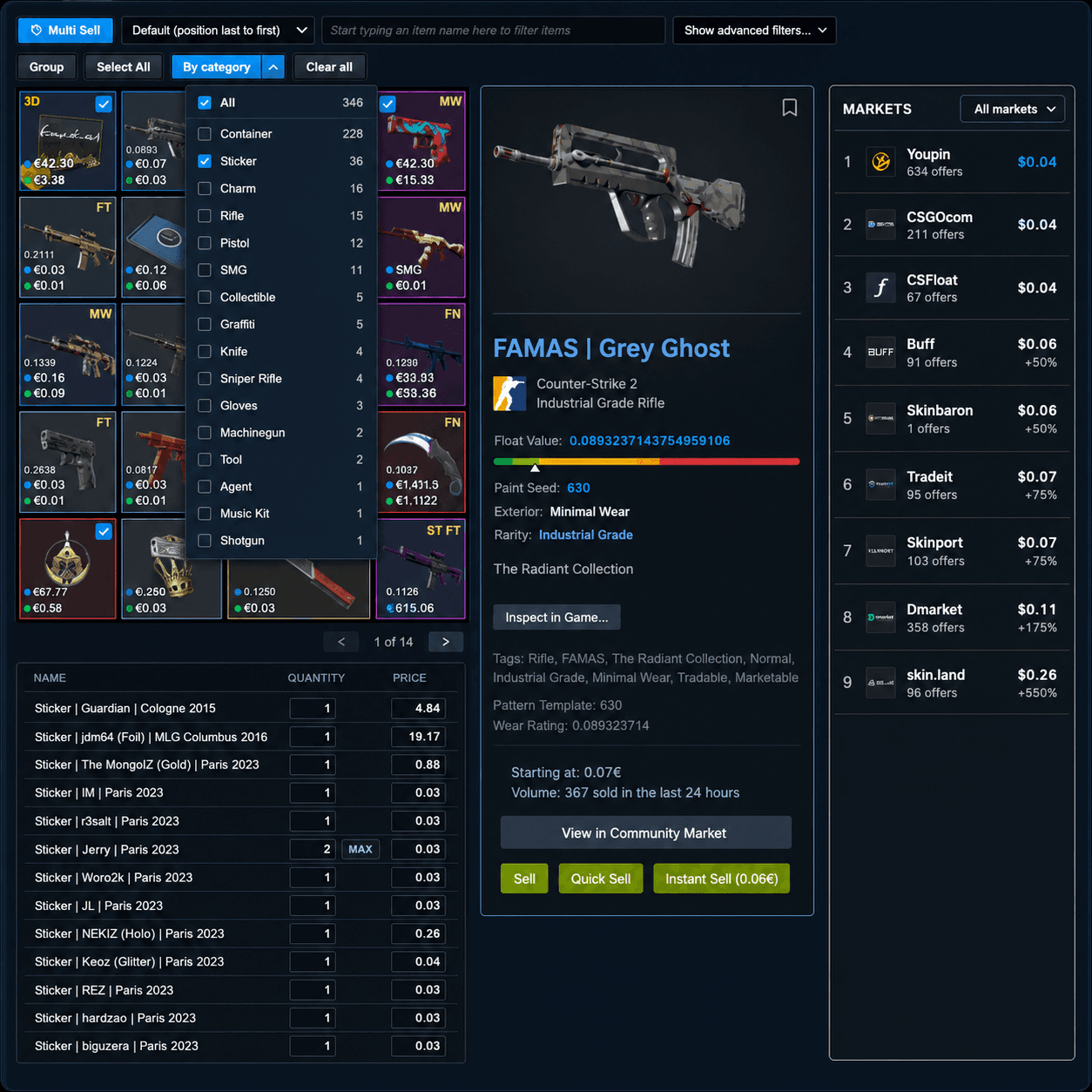
Sell dozens of items without dozens of clicks.
Select as many items as you like and SteamHelper builds a review table with a suggested price for each one. Check everything, adjust what you want, then list it all in one go — nothing goes up for sale until you say so.
- See every price before you list a thing
- Filter by category to find items fast
List an item in two clicks.
Right next to Steam's own Sell button, SteamHelper adds two more: one that lists just under the lowest price on the market, and one that lets you type your own price on the spot. No extra windows, no guesswork.
- One click undercuts the lowest listing
- Or type your own price and go
Manage everything you're selling in one place.
SteamHelper adds the lowest market price to every listing you already have on Steam, so you always know if you're priced right. Update several listings together, or cancel the ones you no longer want — no need to open each one by hand.
- See totals and the lowest price for every listing
- Update or cancel several listings at once
Know which phase you're looking at, instantly.
Doppler and Gamma Doppler phases can mean a big difference in value. SteamHelper tags the phase directly on the listing, and lets you filter the market down to only the phases you're after.
- Every Doppler listing shows its phase
- Filter the market by the phases you want
See the better price before you even click.
While you browse Steam Market search results, SteamHelper shows the cheapest price from other marketplaces right under Steam's — so you can compare without opening a single listing.
- The best price under every search result
- Compare marketplaces without opening a single listing
Know what a trade is worth before you accept.
SteamHelper reads both sides of any trade and shows a clear profit-or-loss verdict — with per-item prices and floats. On the offers you receive and on the trades you build yourself.
Spot an unfair offer at a glance.
Every incoming offer gets a net value badge — profit or loss in cash and percent — plus the price and float of each skin. Decline lowballs and scams without doing the math yourself.
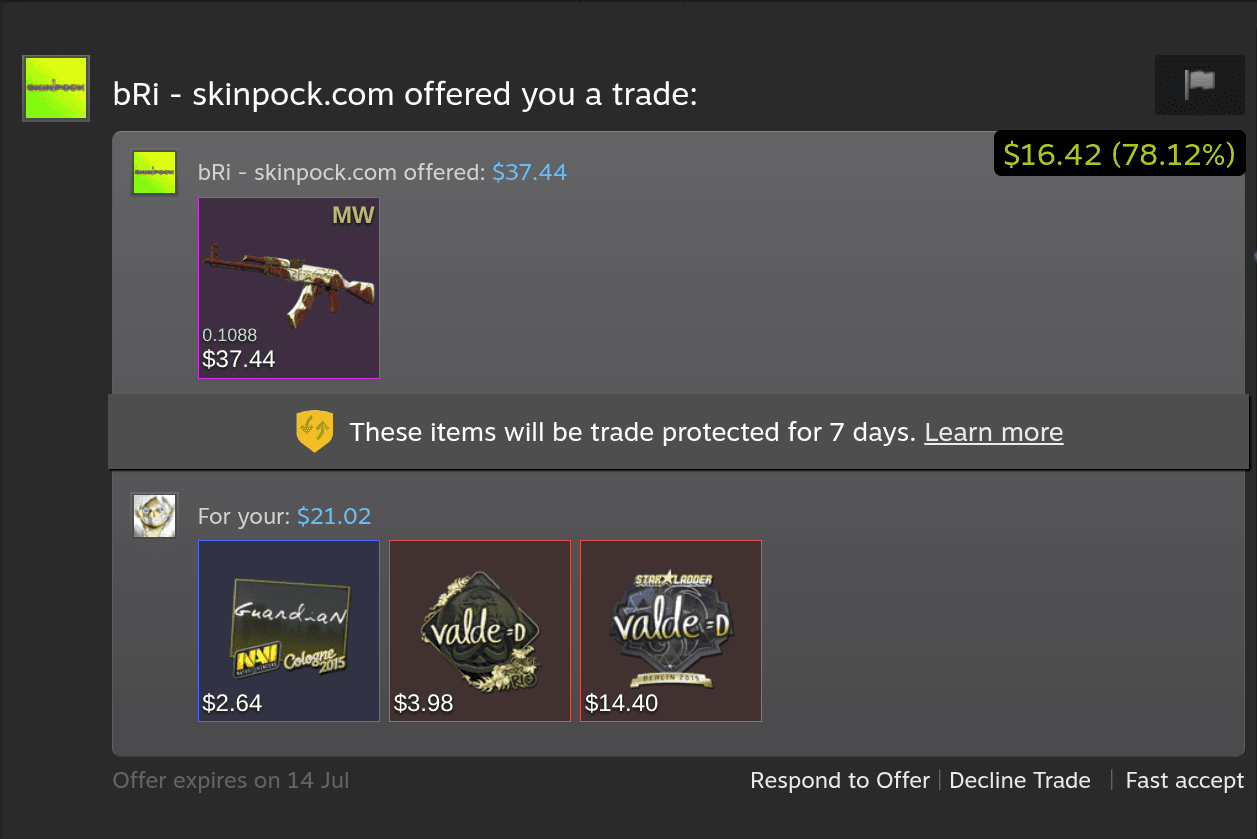
- Net profit or loss
- Per-item prices
- Floats & wear
Balance both sides as you build.
While you put a trade together, SteamHelper totals each inventory live and shows the running difference. Keep adding or removing items until the deal lands exactly where you want it.
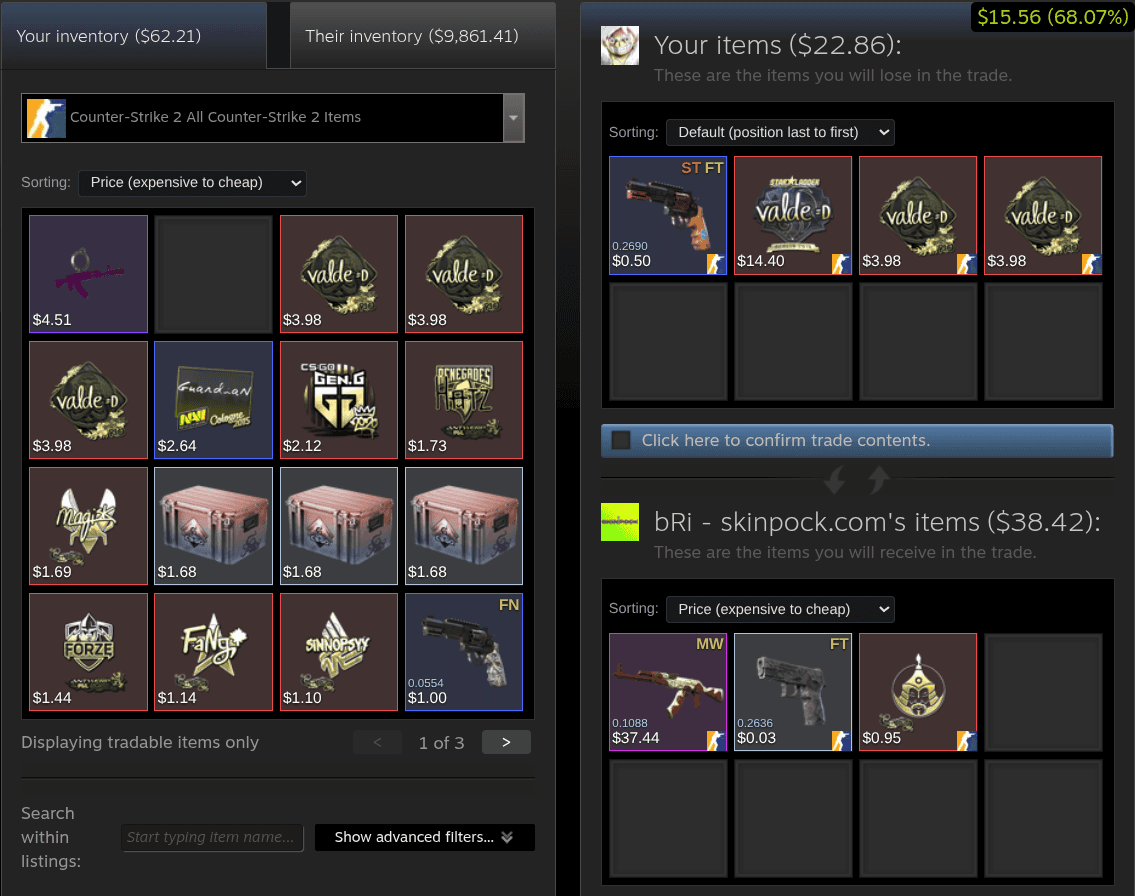
- Live side totals
- Running difference
- Both inventories
The green badge is your instant verdict — what you gain or lose, on every trade.
Steam inventory, market and trade tools without the noise.
SteamHelper focuses on the everyday Steam Inventory Helper questions: what is this CS2 item worth, is this Steam Market price fair, and what happens if I sell or trade it?
Steam Inventory Value
Use SteamHelper as an inventory helper to estimate Steam and CS2 inventory value at a glance.
CS2 Item Price Badges
Add Steam price labels to CS2 skins, cases and stickers.
CS2 Float & Pattern Info
Check CS2 skin float, wear, paint seed and pattern on Steam.
Bulk Sell
Prepare many listings in a review queue before anything is posted.
Auto Pricing
Get price suggestions you can inspect and adjust first.
Auto Accept Gifts
Only gift offers where you give zero items.
Trade Lock Countdown
See when locked items become tradable again.
Steam Market Price Comparison
Compare Steam Market prices with selected marketplaces without tab chaos.
Trade Offer Value
Use a Steam trader helper view to estimate both sides of a trade before you accept or decline.
Control Settings
Turn off anything you do not want on your Steam pages.
Watchlist
Keep an eye on items you are waiting to buy or sell.
Price Alerts
Optional notifications when watched prices move.
Looking for a Steam Inventory Helper alternative?
SteamHelper is built for players who search for a Steam inventory helper, CS inventory helper, Steam market extension or SIH alternative, but want a lighter interface and review-first controls.
Inventory helper for Chrome, Edge, Firefox and Chromium browsers
Install SteamHelper as a Steam Inventory Helper extension in Chrome-compatible browsers or Firefox. It adds inventory value, item price badges, profile inventory panels and settings directly to Steam pages.
CS2 and CSGO market helper
Compare CS2 skin prices, CSGO market listings, float values, wear conditions and external market prices without leaving Steam Community Market pages.
SIH-style inventory workflow
Steam Inventory Helper and SIH-style tools are known for broad trading features. SteamHelper focuses on a lighter UI, no unrelated website access, no hidden normal-trade auto-accept and review-first selling.
Built for the question everyone asks first: is it safe?
- No access to every website you visit
- No hidden automation or silent trade acceptance
- No Steam API key required for core features
- No ads or promo banners injected into your Steam pages
- Automation is opt-in, off by default, and notifies you on every action
You stay in control of every action.
Permission scope
Clear by default
steamcommunity.com
Needed to add inventory and market helpers
SteamHelper API
Used for cached prices and item metadata
All websites
Not required for the core extension
Gift Auto Accept is not normal auto-accept for trades. It only works when you give zero items and receive at least one.
Built for your Steam games.

CS2
LIVE

Dota 2
LIVE

TF2
LIVE

Rust
LIVE
Trust is not a badge. It is how the product behaves.
Explain the data
Prices include source context so players understand why values differ.
Keep Steam readable
Features are compact, optional and designed to avoid turning Steam into a dense dashboard.
Make actions reviewable
Bulk selling builds a list you review and approve before listing, and the only automation, Gift Auto Accept, is gift-only and off by default.
I want to know what my items are worth without turning Steam into a cockpit.
Inventory value
Bulk selling is useful only if I can review the final list before it posts.
Selling workflow
The first thing I check with any Steam extension is permissions and whether trades are safe.
Safety & trust
Frequently asked questions
Everything you need to know about SteamHelper.
Make Steam easier to read
before your next inventory, market or trade decision.
Add the SteamHelper extension, open your Steam inventory and choose exactly which inventory helper, price helper and trade helper features you want to see.