

Steam Inventory Helper til CS2 og mere: skins, priser og handler.
Følg Steam-lagerværdi, CS2-skinpriser, floatdata, markedslister og handelstilbud direkte på Steam med SteamHelper. Til Chrome, Edge, Brave, Firefox og andre Chromium-browsere.
Vælg din browser. Edge bruger Chrome Web Store-versionen.
SteamHelper er tilgængelig for Chrome-kompatible browsere og Firefox. Edge-brugere kan installere den samme Chrome Web Store-version direkte i Microsoft Edge.
Google Chrome
Installer den officielle SteamHelper-version fra Chrome Web Store.

Microsoft Edge
Åbn Chrome Web Store i Edge, og tilføj SteamHelper derfra.

Mozilla Firefox
Brug den særskilte udgivelse hos Mozilla Add-ons til Firefox.
Brave Browser
Brave understøtter udvidelser fra Chrome Web Store, så Chrome-versionen er klar til brug.
Chromium-browsere
Brug udgivelsen i Chrome Web Store til Chromium-baserede browsere.
Klar på få sekunder og nyttig med det samme.
Ingen konto, ingen opsætning — SteamHelper begynder at virke, så snart udvidelsen er installeret.
Tilføj udvidelsen
Installer SteamHelper fra Chrome Web Store på få sekunder. Du behøver hverken en konto eller en opsætning for at komme i gang.
Åbn Steam, som du plejer
Inventarværdi, prismærker og markedssammenligninger vises direkte på Steam Community-sider — uden ekstra faner eller et kontrolpanel, du skal åbne.
Se, hvad der er rimeligt, og beslut dig derefter
Tjek priser, gennemgå handelstilbud, og sæt genstande til salg med en foreslået pris, som du kan justere. Du godkender hver handling, før den udføres.
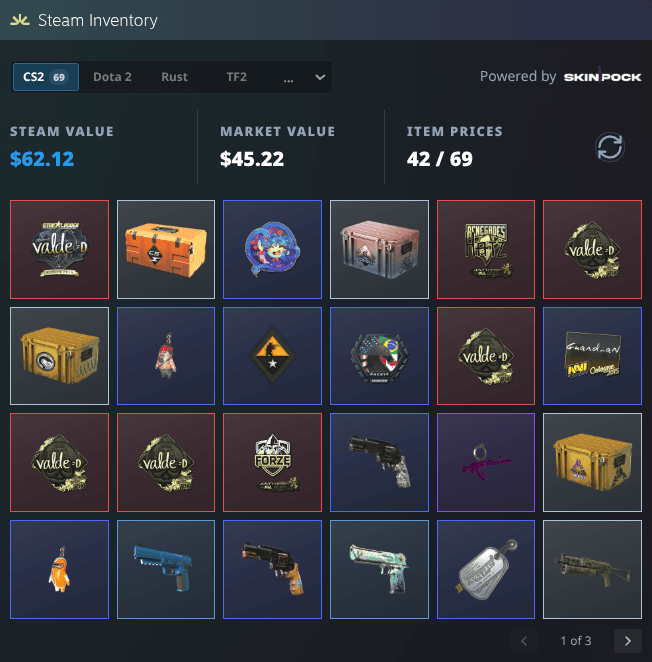
Åbn en Steam-profil. Se, hvad inventaret er værd.
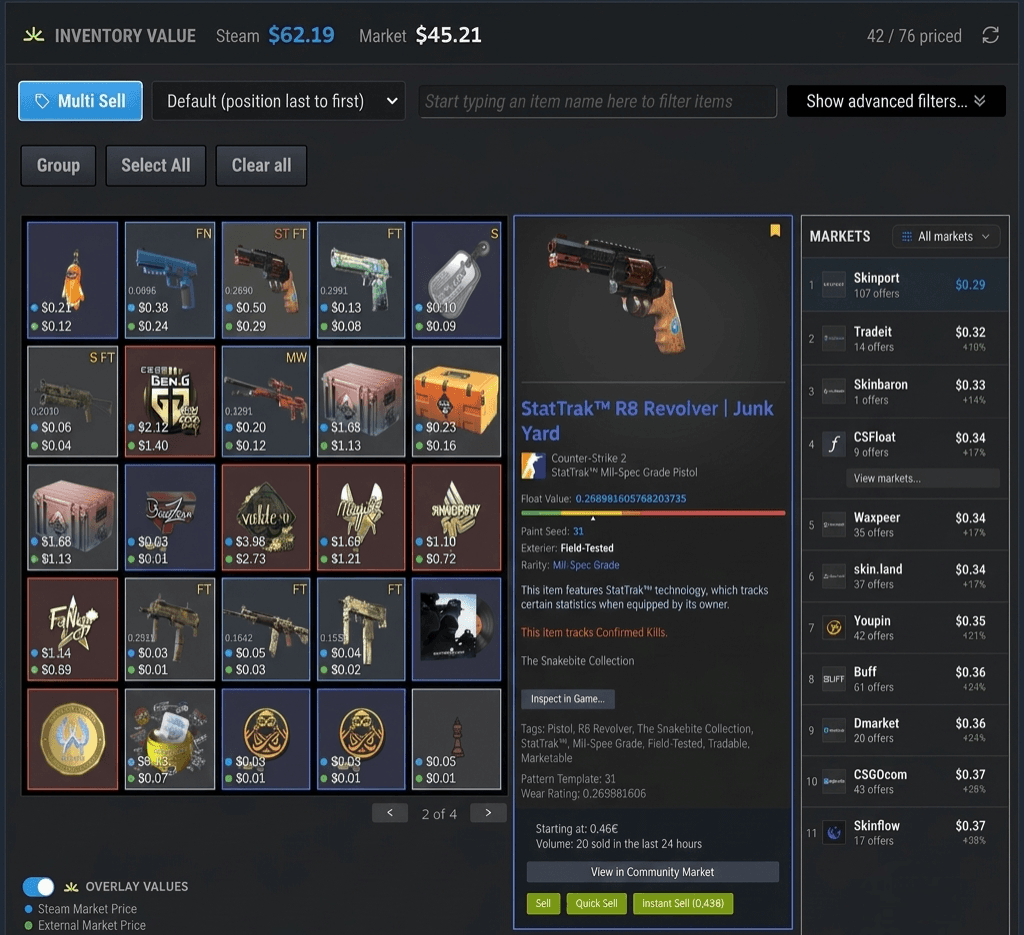
På Steam-profiler og inventarsider tilføjer SteamHelper et Steam Inventory Helper-panel — Steam-værdi ved siden af den reelle markedsværdi, antallet af prissatte CS2-genstande og hele genstandsoversigten. Intet kontrolpanel skal åbnes.
- To totaler med ét blik: Steams referenceværdi og hele inventarets reelle markedsværdi.
- En tydelig optælling — 42 af 69 — så du altid ved, hvor komplet værdiansættelsen er.
- Skift mellem dine Steam-spil, og gennemse alle genstande i én enkel oversigt — med aktuelle totalværdier.
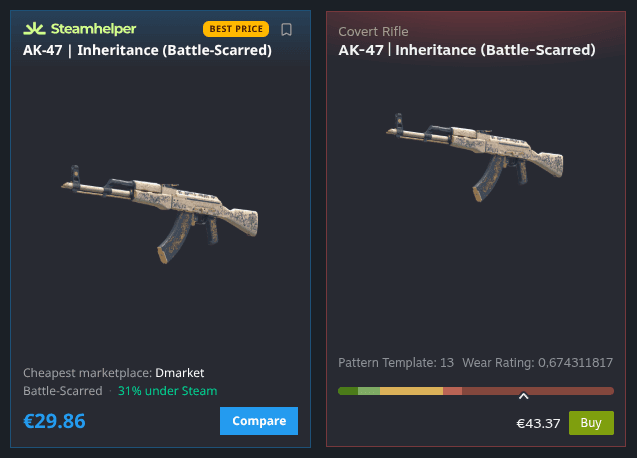
Se det billigste sted at købe — lige ved siden af Steam.
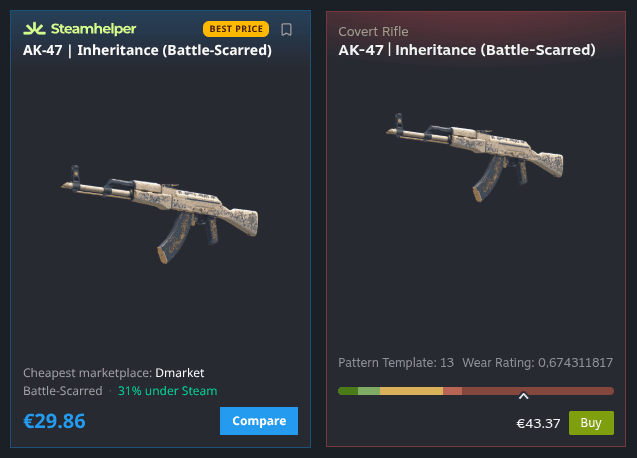
Åbn et hvilket som helst skin på Steam, så tilføjer SteamHelper et kompakt kort med den laveste pris på tværs af pålidelige markedspladser samt besparelsen i forhold til Steam. Ingen skift mellem faner, intet gætværk — bare det bedre tilbud side om side.
- Viser præcis, hvor meget billigere prisen er end på Steam
- Angiver den billigste markedsplads for hver genstand
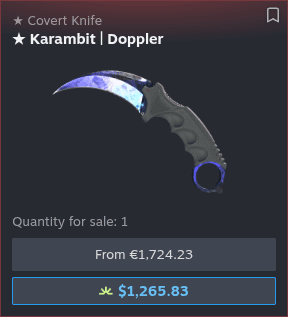
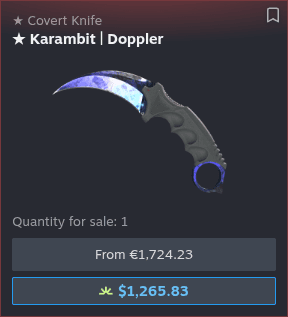
Steams pris er ikke altid den reelle pris.
Steam viser kun sin egen startpris. SteamHelper placerer den reelle laveste markedspris lige nedenunder, så forskellen er umulig at overse — især på knive, handsker og andre værdifulde skins, hvor den kan være på flere hundrede.
- Den laveste markedspris lige under Steams pris
- Store forskelle på dyre genstande med ét blik

Sammenlign alle grader af slitage, før du beslutter dig.
Fra Factory New til Battle-Scarred opstiller SteamHelper hver tilstand med den laveste markedspris ved siden af Steams pris. Du kan straks se, hvilken slitage der faktisk er pengene værd — i stedet for at betale mere for en betegnelse.
- Alle fem tilstande med priser side om side
- Find den slitage, der faktisk er pengene værd
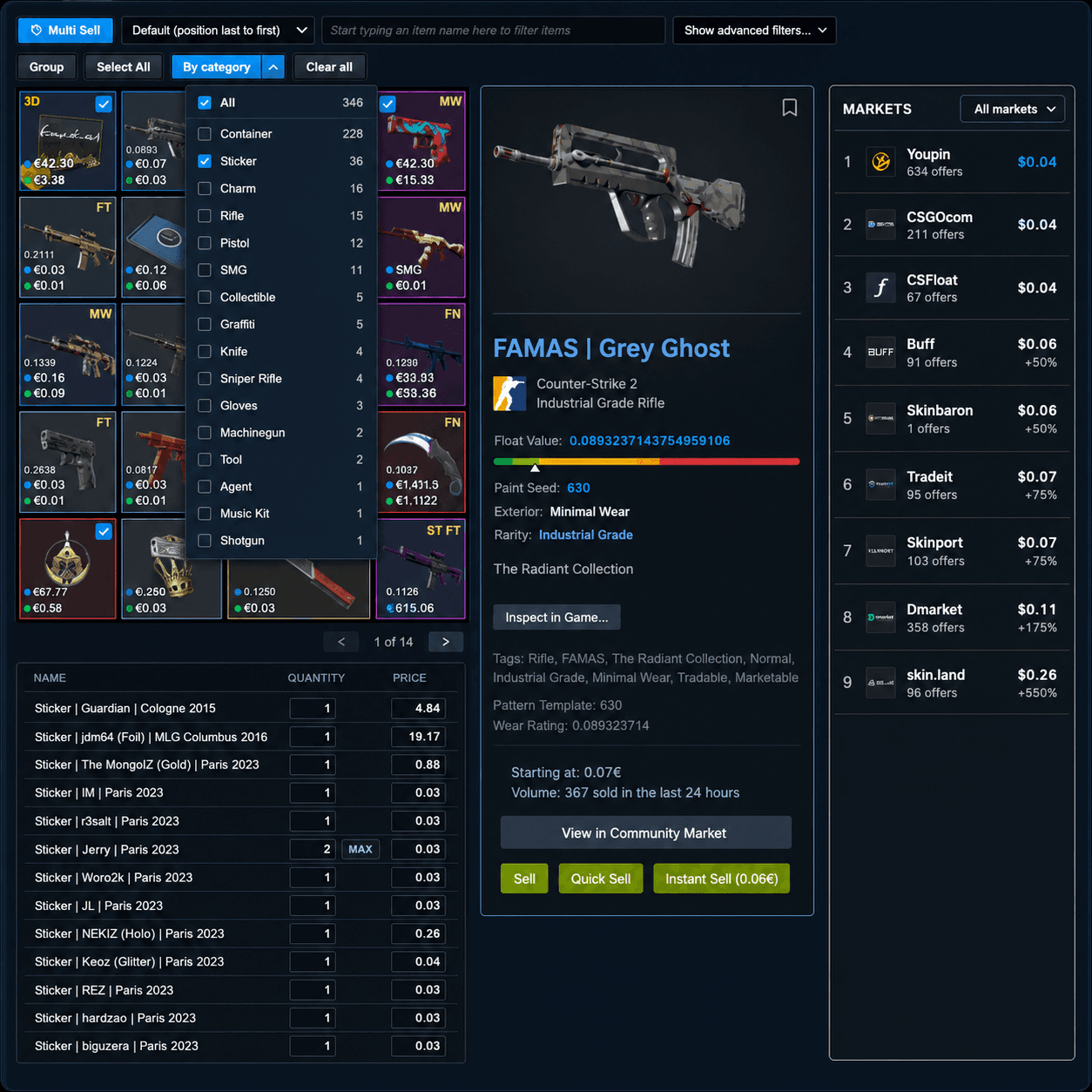
Sælg mange genstande uden mange klik.
Vælg så mange genstande, du vil, og SteamHelper opretter en gennemgangstabel med en foreslået pris for hver enkelt. Kontrollér alt, tilpas det ønskede, og sæt derefter det hele til salg på én gang — intet udbydes, før du siger til.
- Se hver pris, før du sætter noget til salg
- Filtrér efter kategori for hurtigt at finde genstande
Sæt en genstand til salg med to klik.
Lige ved siden af Steams egen salgsknap tilføjer SteamHelper to mere: Én sætter genstanden til salg lige under markedets laveste pris, og én lader dig indtaste din egen pris med det samme. Ingen ekstra vinduer, intet gætværk.
- Ét klik sætter prisen under den billigste annonce
- Eller indtast din egen pris, og kom i gang
Administrer alt, hvad du sælger, ét sted.
SteamHelper føjer den laveste markedspris til hver annonce, du allerede har på Steam, så du altid ved, om prisen er rigtig. Opdater flere annoncer samlet, eller annuller dem, du ikke længere ønsker — uden at åbne hver enkelt manuelt.
- Se totaler og den laveste pris for hver annonce
- Opdater eller annuller flere annoncer på én gang
Se straks, hvilken fase du kigger på.
Doppler- og Gamma Doppler-faser kan gøre en stor forskel for værdien. SteamHelper mærker fasen direkte på annoncen og lader dig filtrere markedet, så du kun ser de faser, du leder efter.
- Hver Doppler-annonce viser sin fase
- Filtrér markedet efter de ønskede faser
Se den bedre pris, før du overhovedet klikker.
Mens du gennemser søgeresultater på Steam Community Market, viser SteamHelper den billigste pris fra andre markedspladser lige under Steams pris — så du kan sammenligne uden at åbne en eneste annonce.
- Den bedste pris under hvert søgeresultat
- Sammenlign markedspladser uden at åbne en annonce
Kend værdien af en handel før du accepterer.
SteamHelper læser begge sider af en handel og viser tydeligt, om du vinder eller taber — med priser og floats for hver genstand. Både på tilbud, du modtager, og handler, du selv bygger.
Opdag et urimeligt tilbud med ét blik.
Hvert indgående tilbud får et mærke med nettoværdien — gevinst eller tab i beløb og procent — samt pris og float for hvert skin. Afvis dårlige tilbud og svindel uden selv at regne på det.
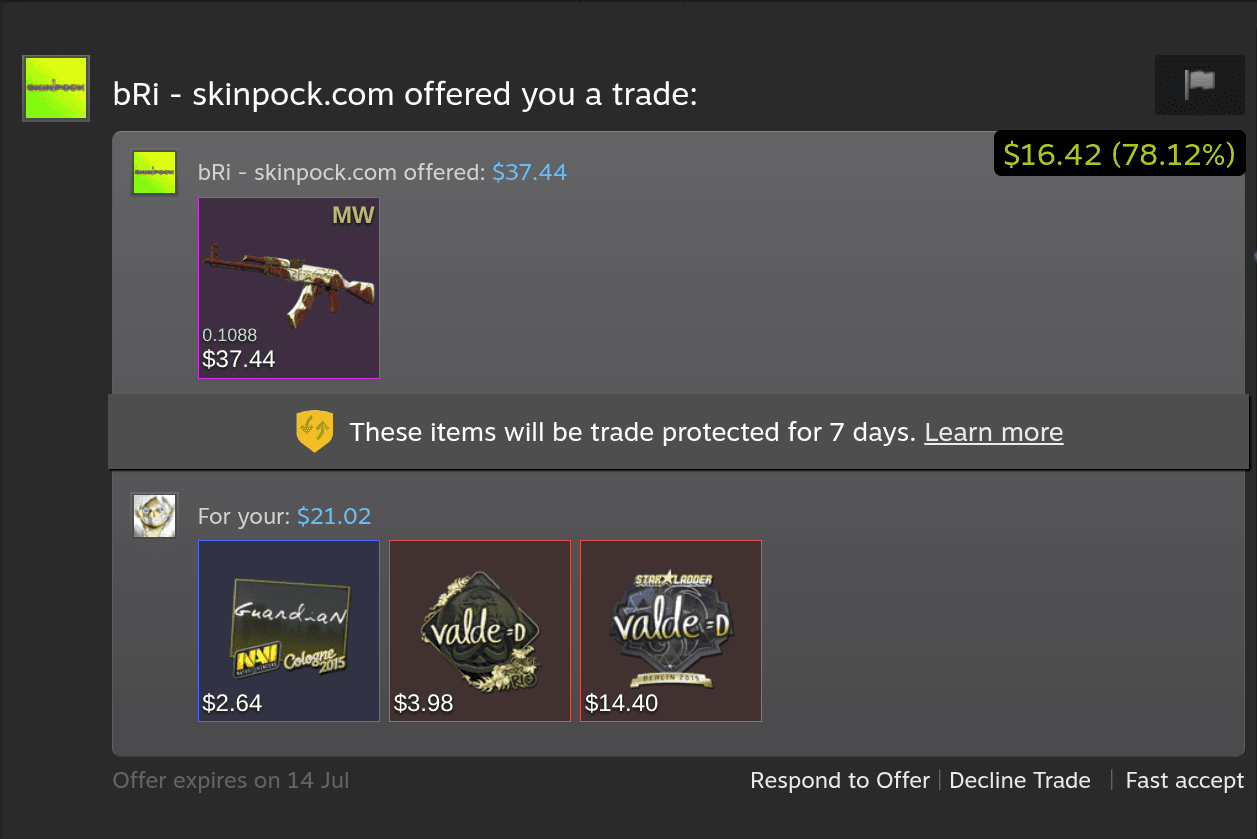
- Nettogevinst eller -tab
- Pris pr. genstand
- Floats og slitage
Afbalancér begge sider, mens du bygger handlen.
Mens du sammensætter en handel, beregner SteamHelper hvert inventar i realtid og viser den løbende forskel. Tilføj eller fjern genstande, indtil aftalen ligger præcis, hvor du ønsker det.
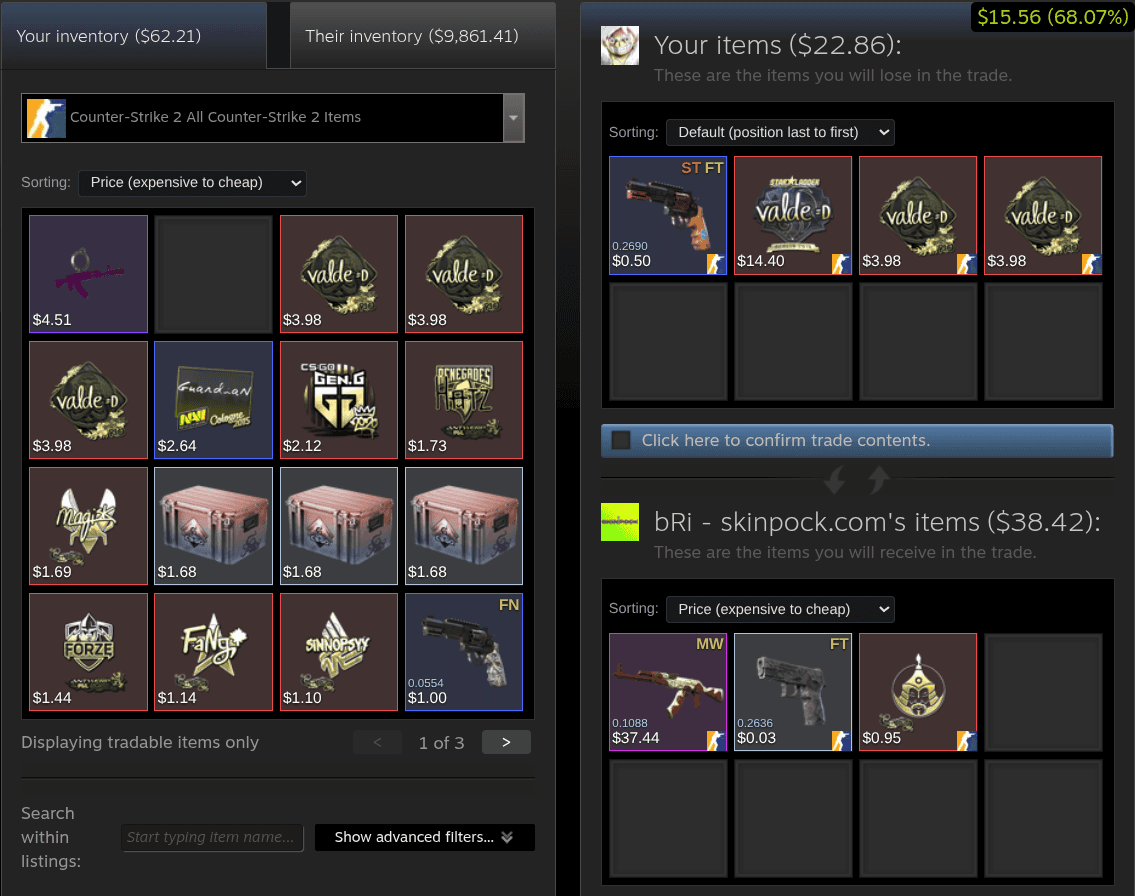
- Totaler for begge sider i realtid
- Løbende forskel
- Begge inventarer
Det grønne mærke giver dig resultatet med det samme — hvad du vinder eller taber på hver handel.
Byt mere sikkert og sælg smartere med vores nyeste værktøjer.
De seneste opdateringer tilføjer partnertjek, gevinstoverblik, værdi af klistermærker, pristendenser og meget mere — direkte på de Steam-sider, du allerede bruger.
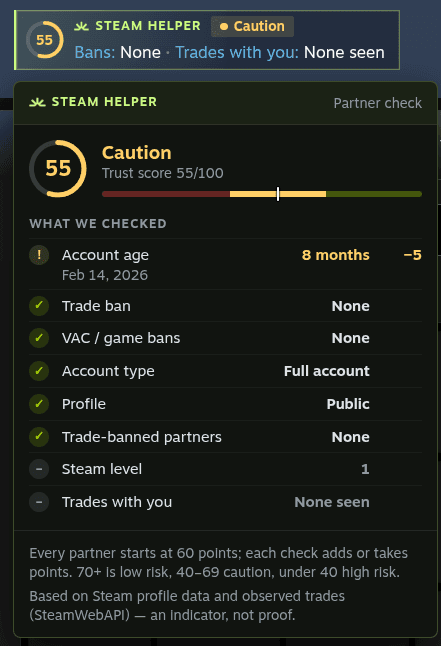
Se, hvem du handler med.
Før du accepterer, giver SteamHelper den anden konto en tillidsscore fra 0 til 100 — baseret på kontoens alder, Steam-niveau, udelukkelser, profilens synlighed og jeres tidligere handler. Den vises direkte i handelsvinduet og er ét klik væk på din tilbudsliste. Et hurtigt signal, ikke en garanti.
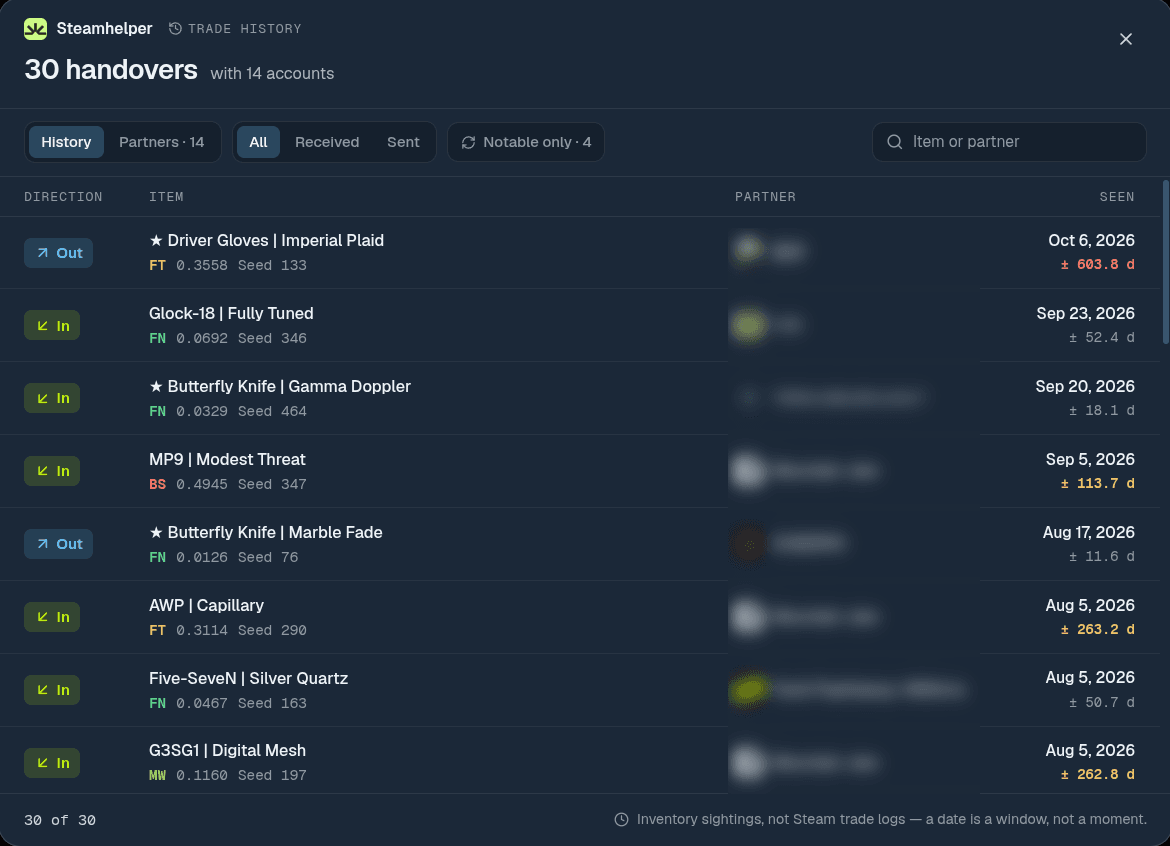
Se byttehistorikken for enhver profil.
Et nyt link »Byttehistorik« på Steam-profiler viser, hvilke genstande en konto har byttet, og hvem den bytter mest med. Hver dato vises med sit tidsvindue, så du altid ved, hvor præcis den er.
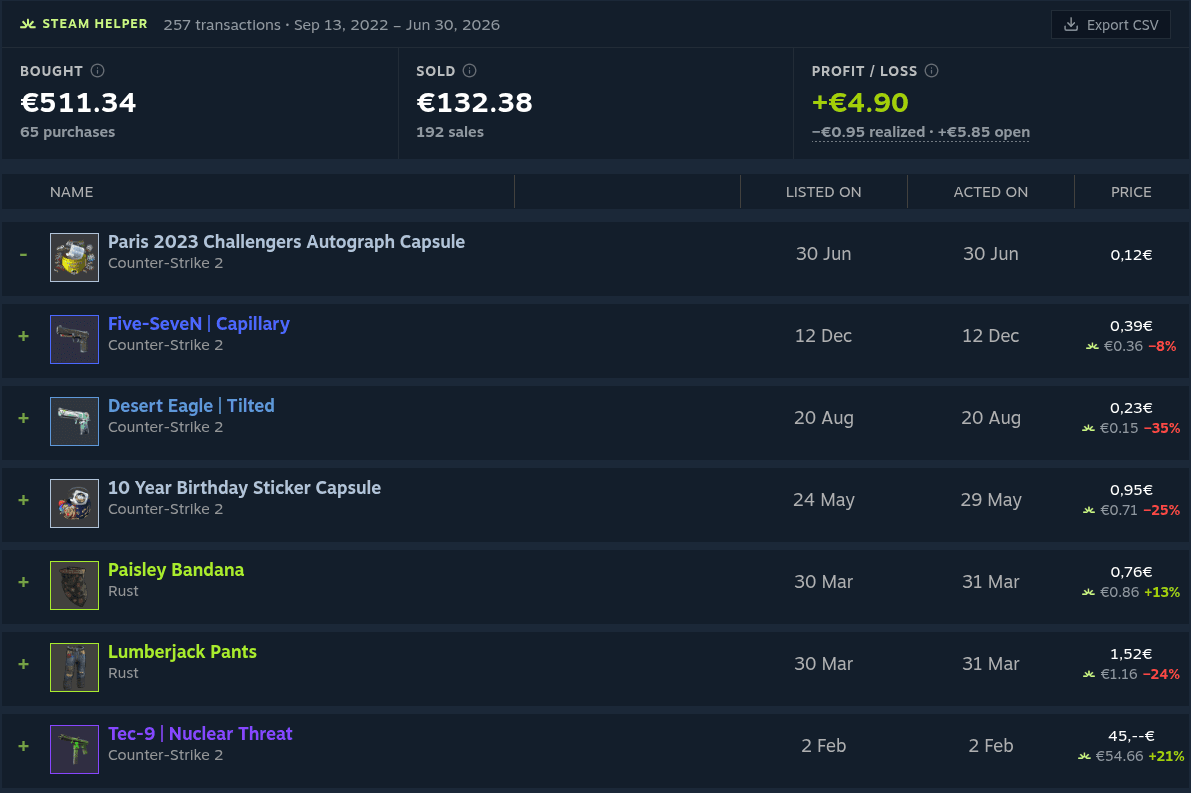
Se, om dine markedskøb kunne betale sig.
Din historik på Steam-markedet får et klart overblik: hvad du har brugt, hvad du har fået efter gebyrer, og din gevinst eller dit tab. Hvert køb viser dagens laveste pris ved siden af det, du betalte — og alt kan eksporteres som CSV.
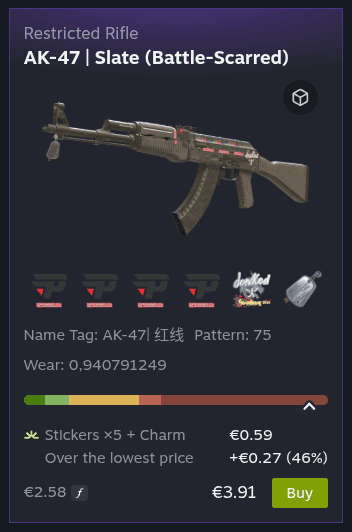
Betal ikke for meget for klistermærker.
Hver CS2-annonce viser, hvad dens klistermærker, vedhæng og patches er værd på Steam-markedet — og hvor meget mere sælgeren beder om end for det billigste eksemplar af samme skin.
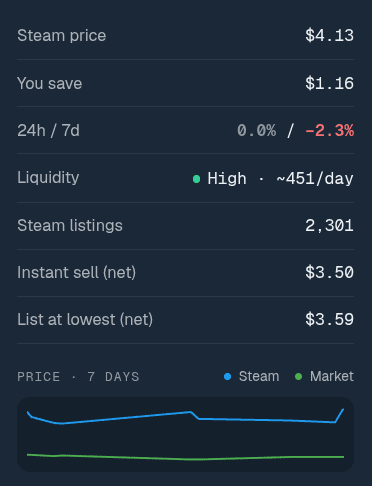
Tjek tendensen, før du køber.
Annoncer, hover-kort og prissammenligninger viser nu prisudviklingen over 24 timer og 7 dage, et 7-dagesdiagram, hvor ofte en genstand sælges, og hvad du får efter gebyrer — plus en advarsel, når en pris ser usædvanlig ud.
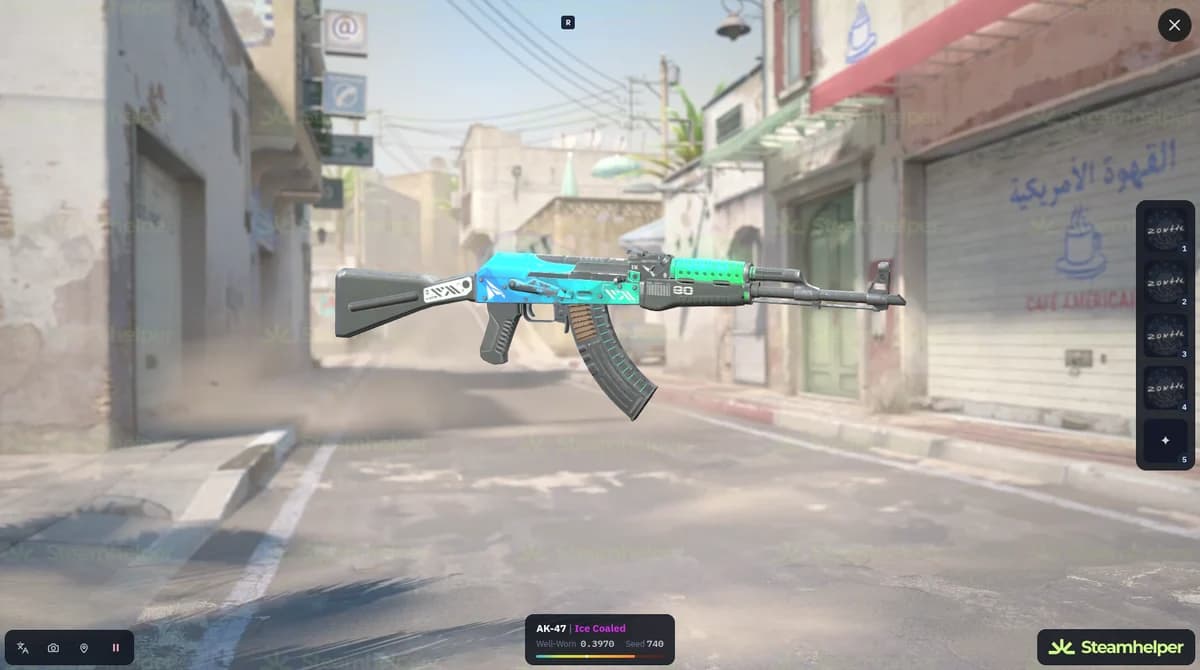
Inspicér CS2-skins i 3D.
Åbn en 3D-visning af våben, knive og handsker direkte i browseren — fra markedsannoncer, dit inventar, byttetilbud og favoritter. Du behøver ikke starte spillet.
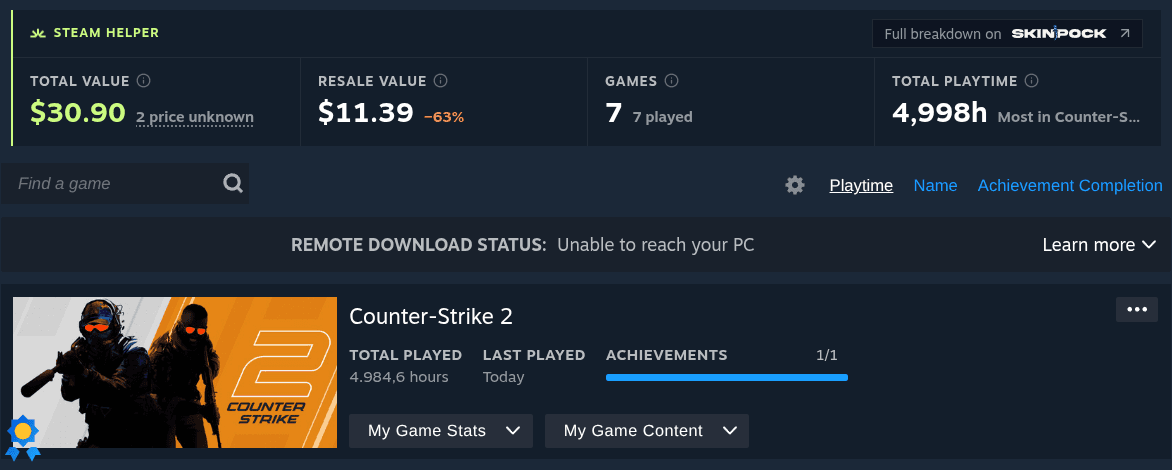
Find ud af, hvad dit spilbibliotek er værd.
På enhver Steam-side med Spil tilføjer SteamHelper bibliotekets samlede butiksværdi, en anslået gensalgsværdi, hvor mange spil der faktisk er blevet spillet, og den samlede spilletid.
Også nyt
Sidespring i inventaret
Spring til første, sidste eller en hvilken som helst side i et stort inventar.
Priser på hver annonce
Den billigste markedspladspris ved siden af Køb-knappen på hver CS2-annonce.
Priser i Populære genstande
Markedspladspriser under genstandene i Steams liste Populære genstande.
Værktøjer til Steam-inventar, marked og handler uden støjen.
SteamHelper fokuserer på de daglige spørgsmål om Steam Inventory Helper: Hvad er denne CS2-genstand værd, er denne Steam-markedspris rimelig, og hvad sker der, hvis jeg sælger eller bytter den?
Værdi af Steam-inventar
Brug SteamHelper som inventarhjælper til hurtigt at anslå værdien af dit Steam- og CS2-inventar.
Prismærker til CS2-genstande
Føj Steam-prismærker til CS2-skins, kasser og klistermærker.
Oplysninger om CS2-float og mønster
Tjek float, slitage, paint seed og mønster for CS2-skins på Steam.
Samlet salg
Forbered mange annoncer i en gennemgangskø, før noget offentliggøres.
Automatiske prisforslag
Få prisforslag, som du kan kontrollere og tilpasse først.
Accepter gaver automatisk
Kun gavetilbud, hvor du ikke afgiver nogen genstande.
Nedtælling for handelslås
Se, hvornår låste genstande igen kan handles.
Sammenligning af Steam-markedspriser
Sammenlign priser på Steam Market med udvalgte markedspladser uden rod med faner.
Værdi af handelstilbud
Brug en handelshjælper til at vurdere begge sider af en handel, før du accepterer eller afviser.
Styr dine indstillinger
Slå alt fra, som du ikke ønsker at se på dine Steam-sider.
Overvågningsliste
Hold øje med genstande, du venter på at købe eller sælge.
Prisalarmer
Få valgfri beskeder, når priserne på overvågede genstande ændrer sig.
Leder du efter et alternativ til Steam Inventory Helper?
SteamHelper er udviklet til spillere, der søger efter en Steam inventory helper, CS inventory helper, Steam-markedsudvidelse eller et SIH-alternativ, men ønsker en lettere brugerflade og kontrol før hver handling.
Inventarhjælper til Chrome, Edge, Firefox og Chromium-browsere
Installer SteamHelper som en Steam Inventory Helper-udvidelse i Chrome-kompatible browsere eller Firefox. Den tilføjer inventarværdi, prismærker, inventarpaneler på profiler og indstillinger direkte på Steam-sider.
Markedshjælper til CS2 og CSGO
Sammenlign priser på CS2-skins, CSGO-markedsannoncer, floatværdier, slidgrader og eksterne markedspriser uden at forlade Steam Community Market.
Inventararbejdsgang i SIH-stil
Steam Inventory Helper og lignende SIH-værktøjer er kendt for omfattende handelsfunktioner. SteamHelper fokuserer på en lettere brugerflade, ingen adgang til uvedkommende websites, ingen skjult automatisk accept af normale handler og kontrol før salg.
Udviklet til det spørgsmål, alle stiller først: Er det sikkert?
- Ingen adgang til alle de websites, du besøger
- Ingen skjult automatisering eller ubemærket accept af handler
- Ingen Steam API-nøgle kræves til kernefunktionerne
- Ingen annoncer eller reklamebannere på dine Steam-sider
- Automatisering er valgfri, slået fra som standard og giver dig besked om hver handling
Du bevarer kontrollen over hver handling.
Tilladelsesområde
Tydeligt som standard
steamcommunity.com
Nødvendig for at tilføje inventar- og markedshjælp
SteamHelper API
Bruges til cachelagrede priser og metadata om genstande
Alle websites
Kræves ikke til kerneudvidelsen
Automatisk accept af gaver er ikke almindelig automatisk accept af handler. Funktionen virker kun, når du ikke afgiver nogen genstande og modtager mindst én.
Udviklet til dine Steam-spil.

CS2
TILGÆNGELIG

Dota 2
TILGÆNGELIG

TF2
TILGÆNGELIG

Rust
TILGÆNGELIG

PUBG
TILGÆNGELIG

s&box
TILGÆNGELIG

Unturned
NÆSTE

PAYDAY 2
TILGÆNGELIG
Tillid er ikke et mærke. Det er sådan, produktet opfører sig.
Forklar dataene
Priser indeholder oplysninger om kilden, så spillere forstår, hvorfor værdier kan variere.
Hold Steam overskueligt
Funktionerne er kompakte, valgfrie og designet til ikke at gøre Steam til et overfyldt kontrolpanel.
Gør handlinger kontrollerbare
Samlet salg opretter en liste, som du gennemgår og godkender før annoncering. Den eneste automatisering, automatisk accept af gaver, gælder kun gaver og er slået fra som standard.
Jeg vil vide, hvad mine genstande er værd, uden at gøre Steam til et cockpit.
Inventarværdi
Samlet salg er kun nyttigt, hvis jeg kan gennemgå den endelige liste, før den offentliggøres.
Salgsforløb
Det første, jeg tjekker ved enhver Steam-udvidelse, er tilladelserne, og om handler er sikre.
Sikkerhed og tillid
Ofte stillede spørgsmål
Alt, hvad du behøver at vide om SteamHelper.
Gør Steam nemmere at overskue
før din næste beslutning om inventar, marked eller handel.
Tilføj SteamHelper-udvidelsen, åbn dit Steam-inventar, og vælg præcis de funktioner til inventar, priser og handler, du ønsker at se.