

Steam Inventory Helper dla CS2 i nie tylko: skiny, ceny i wymiany.
Sprawdzaj wartość ekwipunku Steam, ceny skinów CS2, dane float, oferty rynku i propozycje wymiany bezpośrednio na Steam dzięki SteamHelper. Działa w Chrome, Edge, Brave, Firefox i innych przeglądarkach Chromium.
Wybierz przeglądarkę. Edge korzysta z wersji Chrome Web Store.
SteamHelper działa w przeglądarkach zgodnych z Chrome oraz w Firefox. Użytkownicy Edge mogą zainstalować tę samą wersję z Chrome Web Store bezpośrednio w Microsoft Edge.
Google Chrome
Zainstaluj oficjalną wersję SteamHelper z Chrome Web Store.

Microsoft Edge
Otwórz Chrome Web Store w Edge i stamtąd dodaj SteamHelper.

Mozilla Firefox
Skorzystaj z osobnej strony rozszerzenia w Mozilla Add-ons dla Firefox.
Brave Browser
Brave obsługuje rozszerzenia z Chrome Web Store, więc wersja dla Chrome jest gotowa do użycia.
Przeglądarki Chromium
W przeglądarkach opartych na Chromium użyj wersji z Chrome Web Store.
Konfiguracja w kilka sekund, korzyści od razu.
Bez konta i bez konfiguracji — SteamHelper zaczyna działać natychmiast po instalacji.
Dodaj rozszerzenie
Zainstaluj SteamHelper z Chrome Web Store w kilka sekund. Aby zacząć, nie potrzebujesz konta ani żadnej konfiguracji.
Otwórz Steam jak zwykle
Wartość ekwipunku, etykiety cen i porównania rynkowe pojawiają się bezpośrednio na stronach Steam Community — bez dodatkowych kart i osobnego panelu.
Sprawdź, czy oferta jest uczciwa, i zdecyduj
Sprawdzaj ceny, przeglądaj oferty wymiany i wystawiaj przedmioty z sugerowaną ceną, którą możesz zmienić. Każdą czynność zatwierdzasz przed jej wykonaniem.
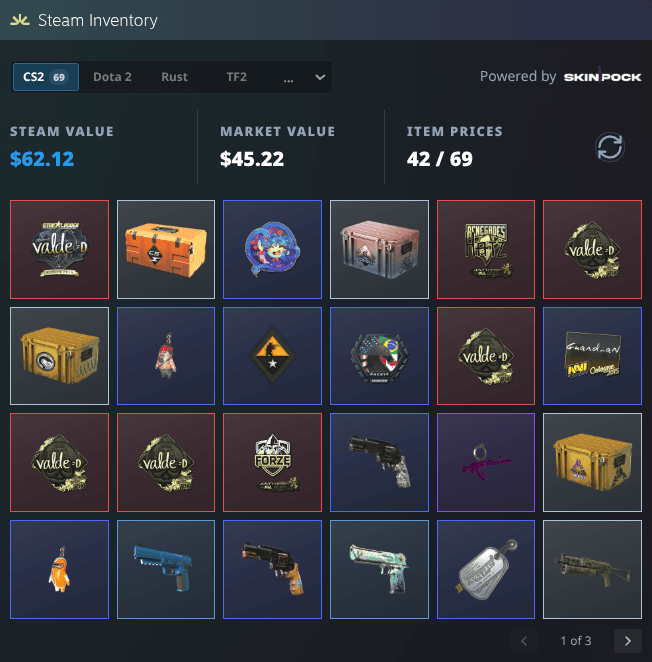
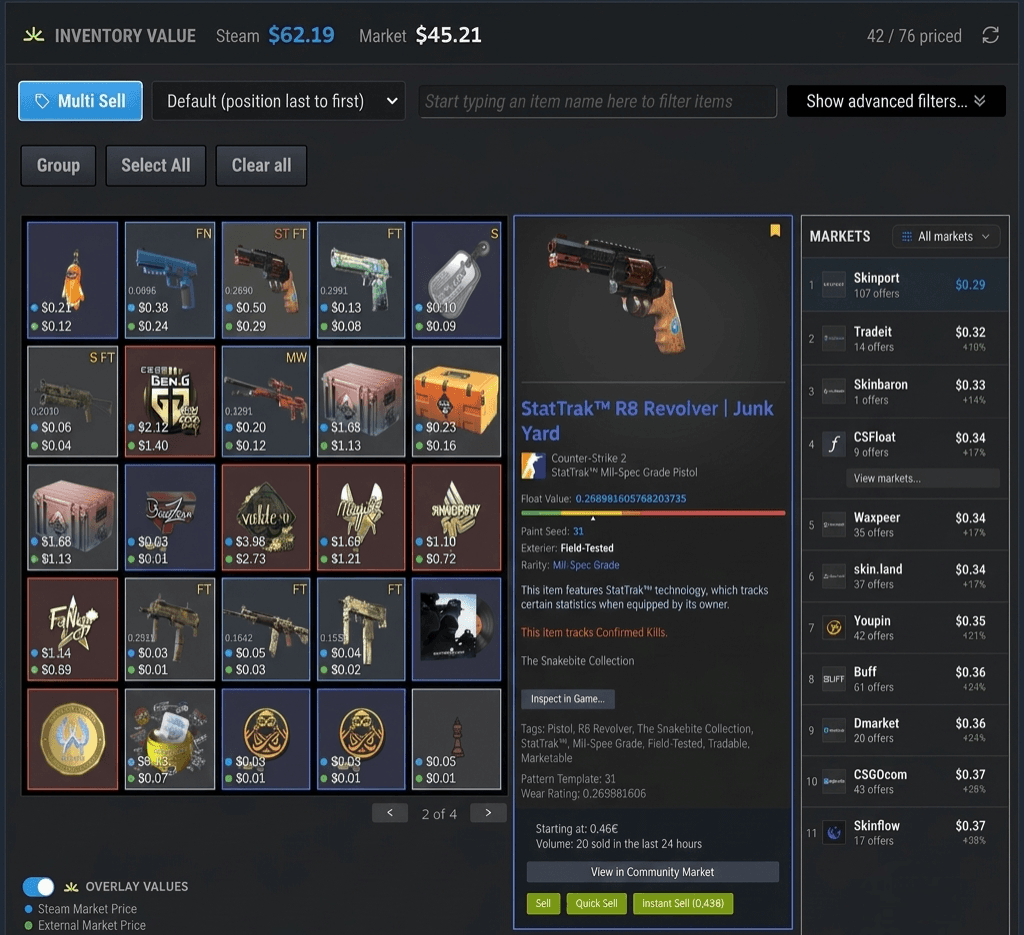
Otwórz profil Steam i sprawdź wartość ekwipunku.
Na stronach profilu i ekwipunku SteamHelper dodaje panel Steam Inventory Helper — wartość Steam obok rzeczywistej wartości rynkowej, liczbę wycenionych przedmiotów CS2 oraz pełną siatkę przedmiotów. Bez otwierania osobnego panelu.
- Dwie sumy w jednym miejscu: wartość referencyjna Steam i rzeczywista wartość rynkowa całego ekwipunku.
- Czytelna liczba wycenionych przedmiotów — 42 z 69 — dzięki której zawsze wiesz, jak kompletna jest wycena.
- Przełączaj się między grami Steam i przeglądaj wszystkie przedmioty w prostej siatce z aktualizowanymi na żywo sumami wartości.
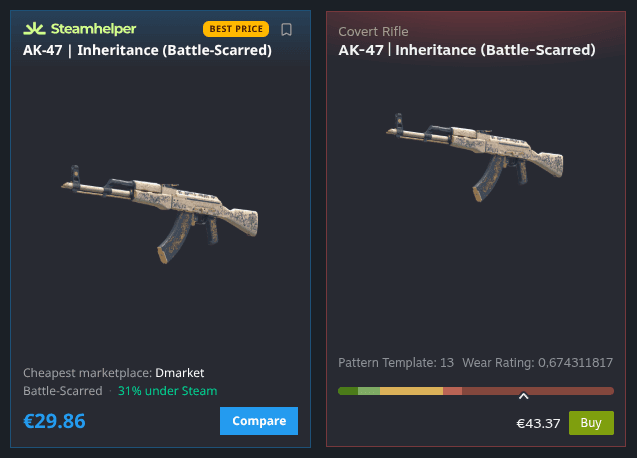
Znajdź najtańsze miejsce zakupu — tuż obok Steam.
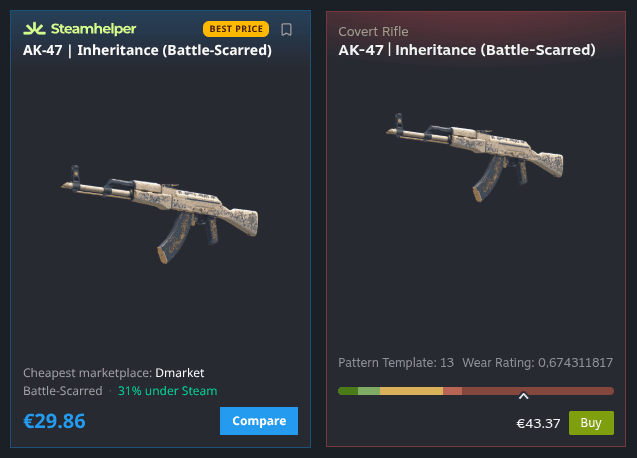
Otwórz dowolny skin na Steam, a SteamHelper doda kompaktową kartę z najniższą ceną z zaufanych platform handlowych oraz informacją, o ile jest ona niższa od ceny Steam. Bez przełączania kart i zgadywania — tylko lepsza oferta pokazana obok.
- Pokazuje dokładnie, o ile cena jest niższa niż na Steam
- Wskazuje najtańszą platformę dla każdego przedmiotu
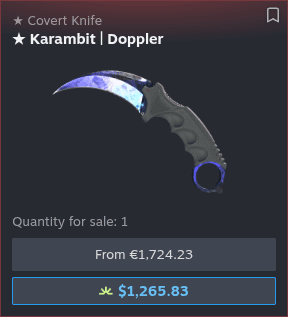
Cena na Steam nie zawsze jest ceną rzeczywistą.
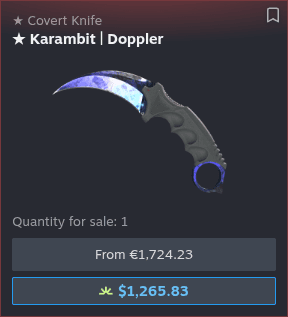
Steam pokazuje tylko własną cenę początkową. SteamHelper umieszcza bezpośrednio pod nią prawdziwą najniższą cenę rynkową, więc różnicy nie da się przeoczyć — zwłaszcza w przypadku noży, rękawic i innych drogich skinów, gdzie może ona wynosić setki.
- Najniższa cena rynkowa tuż pod ceną Steam
- Duże różnice cen drogich przedmiotów widoczne od razu

Porównaj każdy poziom zużycia przed zakupem.
Od Factory New po Battle-Scarred — SteamHelper zestawia każdy stan z jego najniższą ceną rynkową i ceną Steam. Od razu widzisz, który poziom zużycia naprawdę się opłaca, zamiast dopłacać za samą nazwę.
- Wszystkie pięć stanów i ich ceny obok siebie
- Szybko znajdź stan, który naprawdę się opłaca
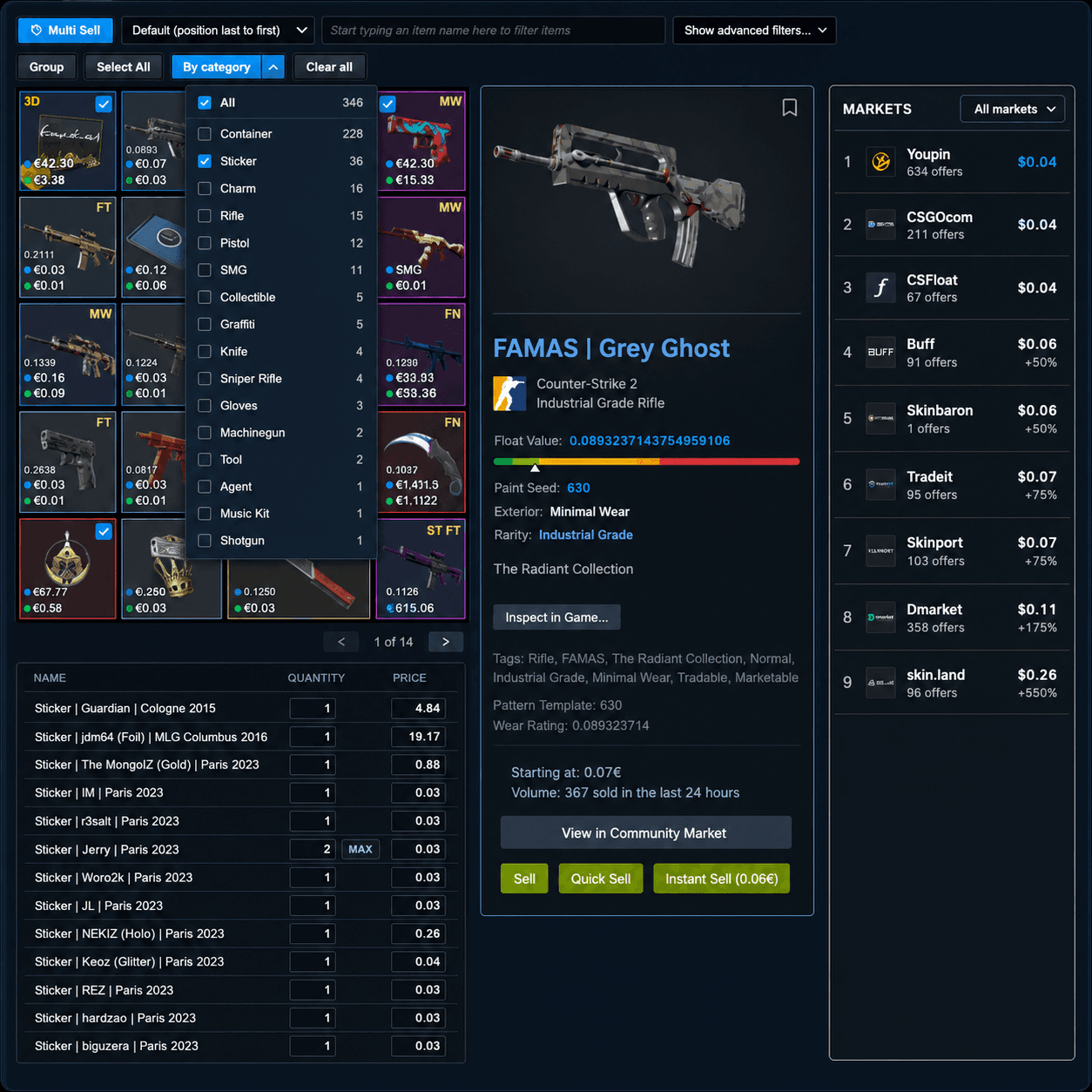
Sprzedawaj dziesiątki przedmiotów bez dziesiątek kliknięć.
Wybierz dowolną liczbę przedmiotów, a SteamHelper utworzy tabelę do sprawdzenia z sugerowaną ceną każdego z nich. Sprawdź wszystko, zmień wybrane wartości i wystaw całość naraz — nic nie trafi na sprzedaż bez Twojej zgody.
- Sprawdź każdą cenę przed wystawieniem przedmiotu
- Filtruj według kategorii, aby szybko znaleźć przedmioty
Wystaw przedmiot dwoma kliknięciami.
Obok przycisku Sprzedaj na Steam SteamHelper dodaje dwa kolejne: jeden wystawia przedmiot tuż poniżej najniższej ceny rynkowej, a drugi pozwala od razu wpisać własną cenę. Bez dodatkowych okien i zgadywania.
- Jedno kliknięcie przebija najtańszą ofertę
- Albo wpisz własną cenę i gotowe
Zarządzaj całą sprzedażą w jednym miejscu.
SteamHelper dodaje najniższą cenę rynkową do każdej Twojej oferty na Steam, dzięki czemu zawsze wiesz, czy cena jest odpowiednia. Aktualizuj kilka ofert jednocześnie lub anuluj te, których już nie chcesz — bez otwierania każdej z osobna.
- Zobacz sumy i najniższą cenę dla każdej oferty
- Aktualizuj lub anuluj kilka ofert jednocześnie
Natychmiast rozpoznaj, na którą fazę patrzysz.
Fazy Doppler i Gamma Doppler mogą znacząco wpływać na wartość. SteamHelper oznacza fazę bezpośrednio w ofercie i pozwala filtrować rynek tak, aby wyświetlić tylko te fazy, których szukasz.
- Każda oferta Doppler pokazuje swoją fazę
- Filtruj rynek według wybranych faz
Zobacz lepszą cenę jeszcze przed kliknięciem.
Podczas przeglądania wyników wyszukiwania na Rynku Steam SteamHelper pokazuje najniższą cenę z innych platform tuż pod ceną Steam — możesz więc porównywać bez otwierania ani jednej oferty.
- Najlepsza cena pod każdym wynikiem wyszukiwania
- Porównuj platformy bez otwierania ofert
Poznaj wartość wymiany zanim ją zaakceptujesz.
SteamHelper analizuje obie strony każdej wymiany i pokazuje jasny wynik zysku lub straty — z cenami i wartościami float poszczególnych przedmiotów. Zarówno w otrzymanych ofertach, jak i tworzonych przez Ciebie wymianach.
Rozpoznaj nieuczciwą ofertę jednym spojrzeniem.
Każda otrzymana oferta dostaje etykietę wartości netto — zysk lub stratę w gotówce i procentach — a także cenę i float każdego skina. Odrzucaj zaniżone oferty i próby oszustwa bez samodzielnego liczenia.
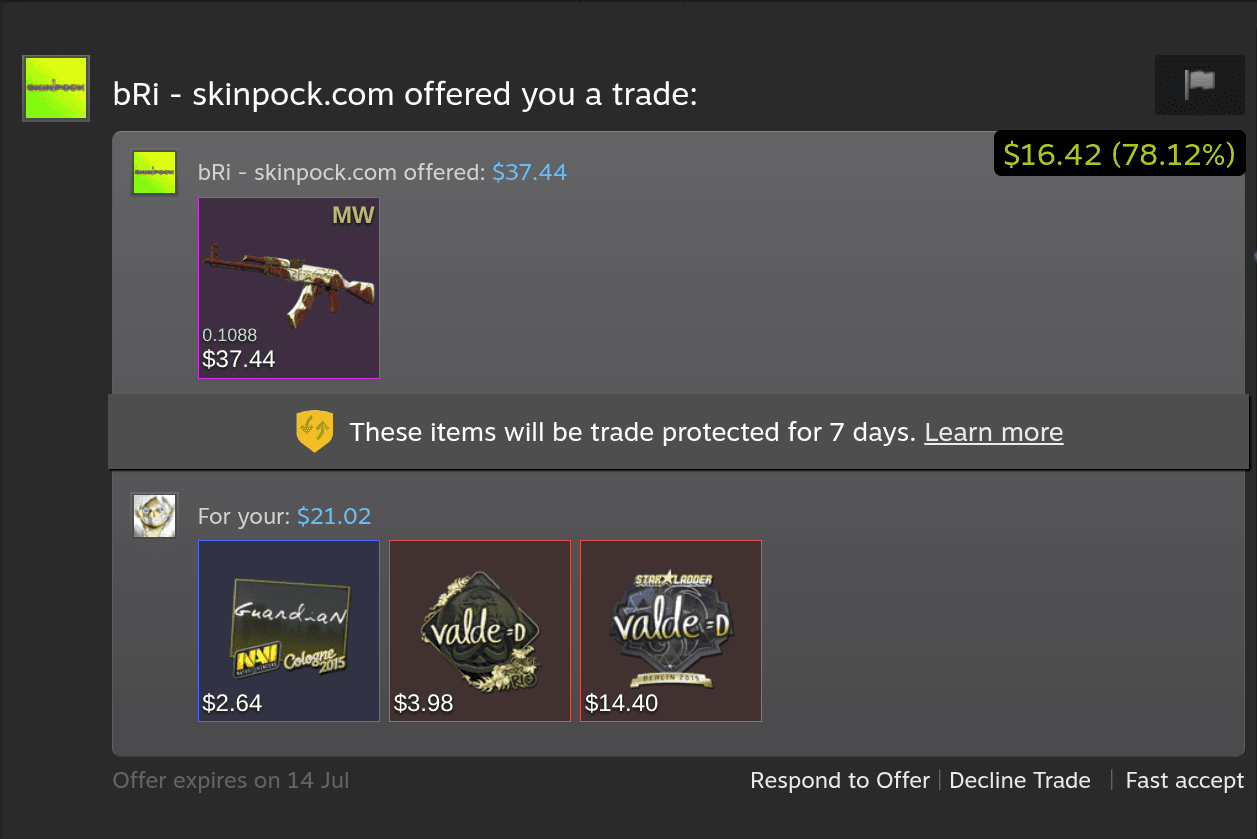
- Zysk lub strata netto
- Ceny poszczególnych przedmiotów
- Float i zużycie
Równoważ obie strony podczas tworzenia oferty.
Gdy tworzysz wymianę, SteamHelper na żywo sumuje wartość obu ekwipunków i pokazuje bieżącą różnicę. Dodawaj lub usuwaj przedmioty, aż oferta będzie dokładnie taka, jak chcesz.
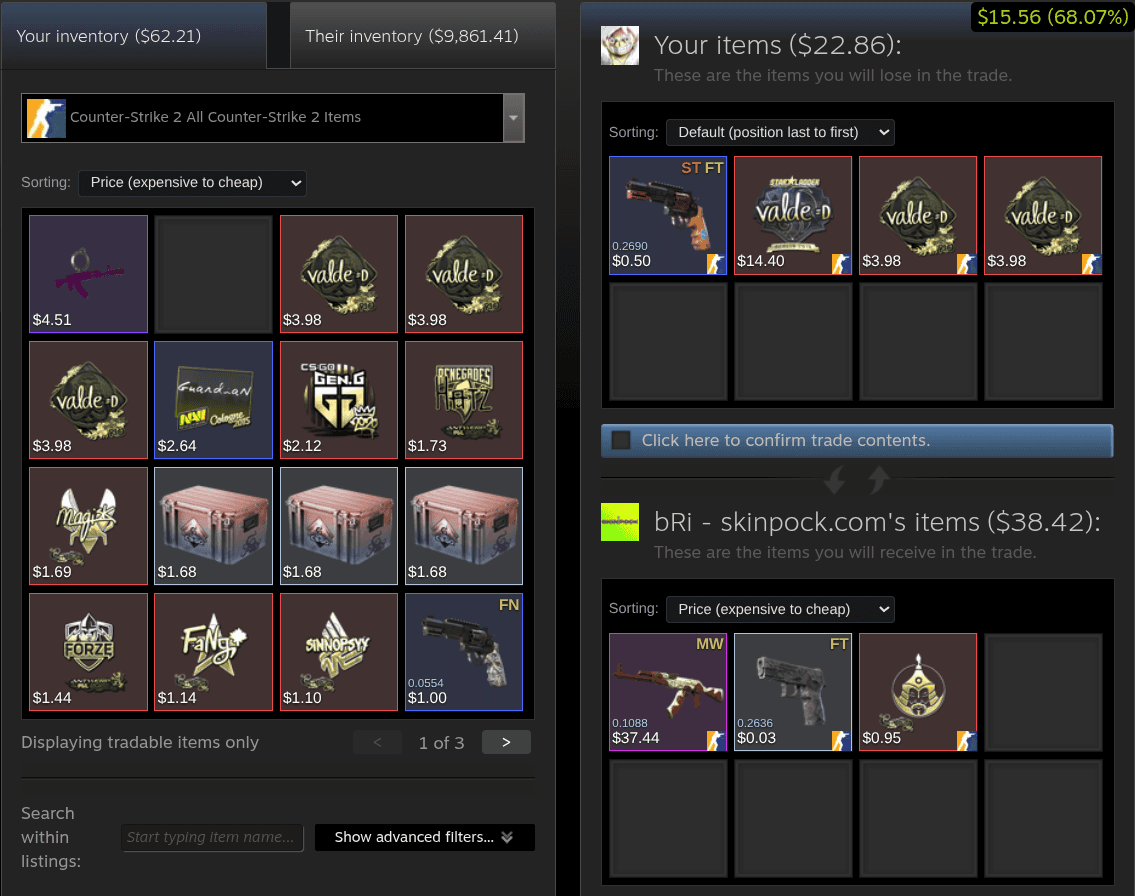
- Sumy stron na żywo
- Bieżąca różnica
- Oba ekwipunki
Zielona etykieta to natychmiastowy werdykt — pokazuje, ile zyskujesz lub tracisz na każdej wymianie.
Bezpieczniejsze wymiany i mądrzejsza sprzedaż dzięki naszym najnowszym narzędziom.
Najnowsze aktualizacje dodają sprawdzanie partnera, śledzenie zysków, wartość naklejek, trendy cen i nie tylko — bezpośrednio na stronach Steam, z których już korzystasz.
Wiedz, z kim się wymieniasz.
Zanim zaakceptujesz, SteamHelper przyznaje drugiemu kontu wynik zaufania od 0 do 100 — na podstawie wieku konta, poziomu Steam, banów, widoczności profilu i waszych wcześniejszych wymian. Wynik pojawia się bezpośrednio w oknie wymiany, a na liście ofert jest o jedno kliknięcie dalej. Szybka wskazówka, nie gwarancja.
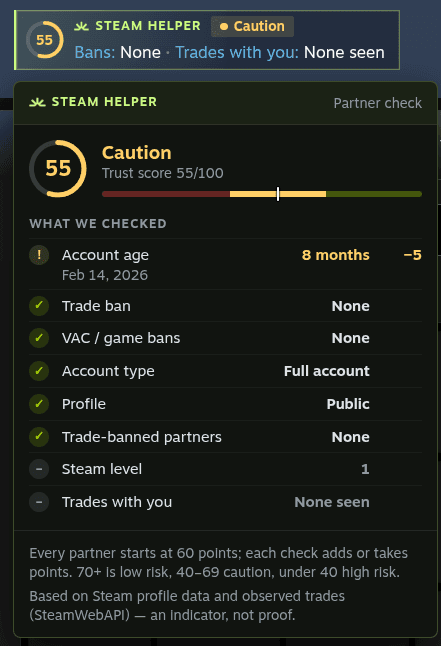
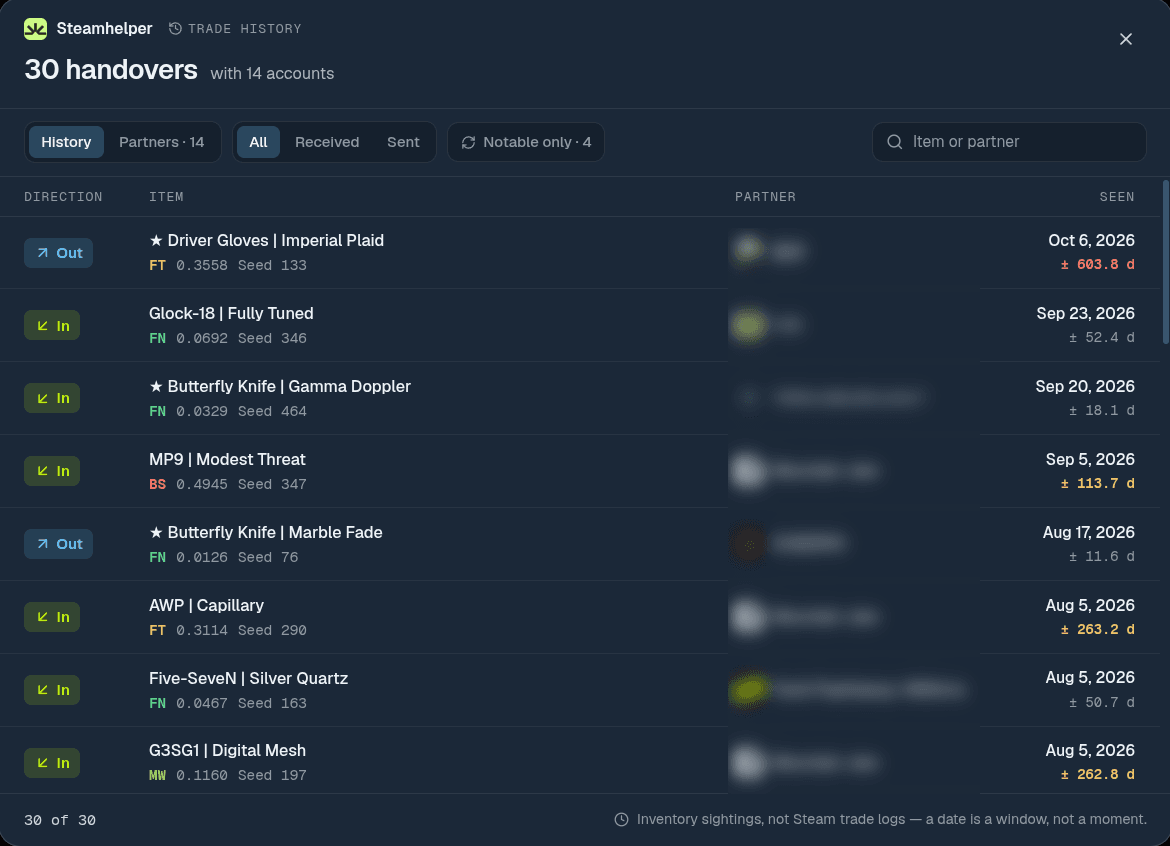
Sprawdź historię wymian dowolnego profilu.
Nowy link „Historia wymian” na profilach Steam pokazuje, jakimi przedmiotami wymieniało się konto i z kim wymienia się najczęściej. Każda data ma swoje okno czasowe, więc zawsze wiesz, jak jest dokładna.
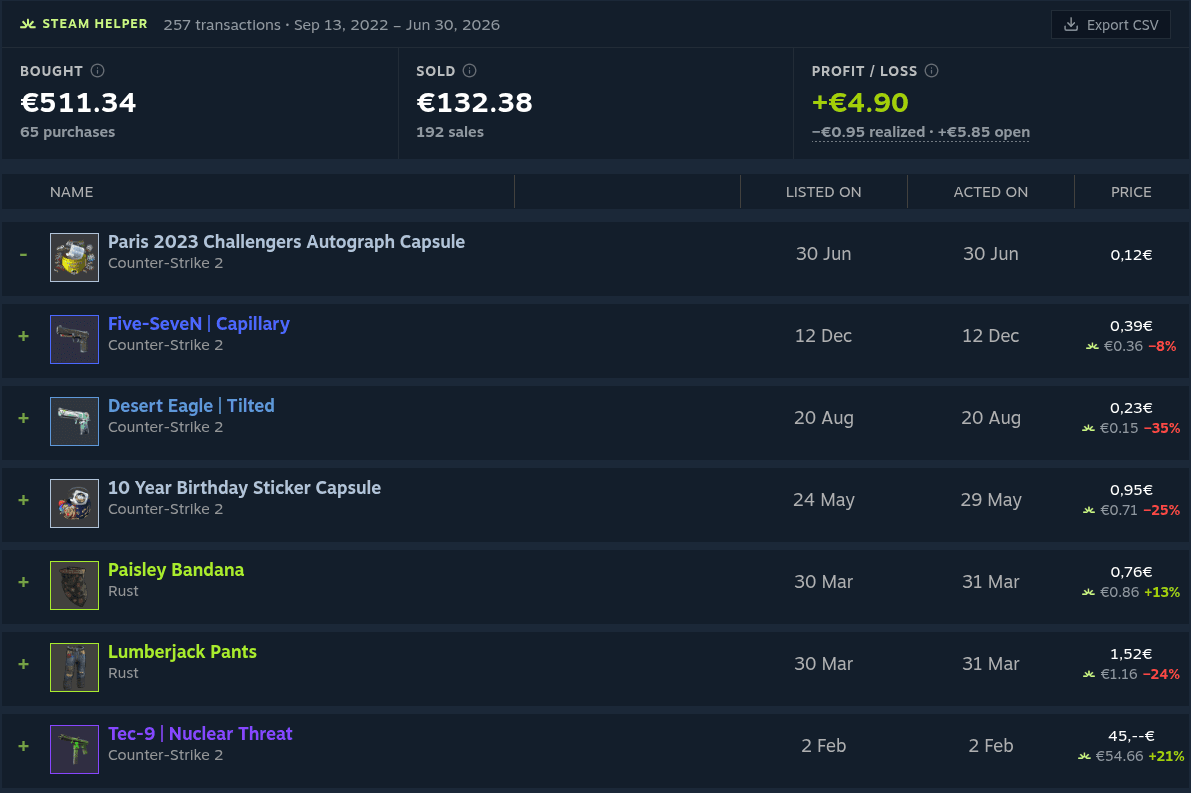
Sprawdź, czy zakupy na rynku się opłaciły.
Twoja historia na Rynku Steam zyskuje czytelne podsumowanie: wydatki, kwoty otrzymane po prowizjach oraz zysk lub stratę. Przy każdym zakupie widać dzisiejszą najniższą cenę obok ceny zakupu — a wszystko możesz wyeksportować do CSV.
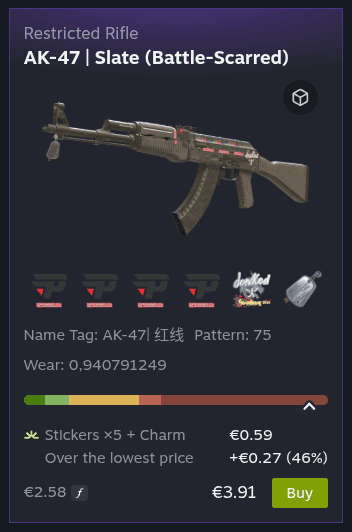
Nie przepłacaj za naklejki.
Każda oferta CS2 pokazuje, ile warte są jej naklejki, zawieszka i naszywki na Rynku Steam — i o ile więcej sprzedający chce niż za najtańszy egzemplarz tego samego skina.
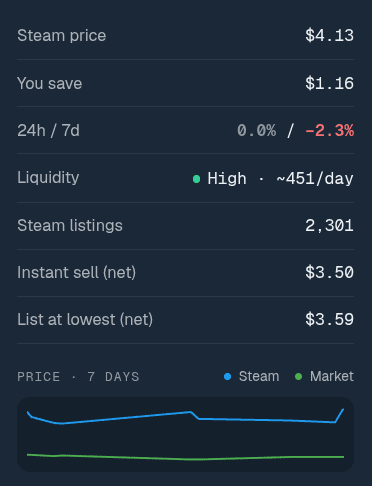
Sprawdź trend przed zakupem.
Oferty, karty po najechaniu i porównania cen pokazują teraz zmiany ceny z 24 godzin i 7 dni, wykres z 7 dni, jak często przedmiot się sprzedaje i ile dostaniesz po prowizjach — a także ostrzeżenie, gdy cena wygląda nietypowo.
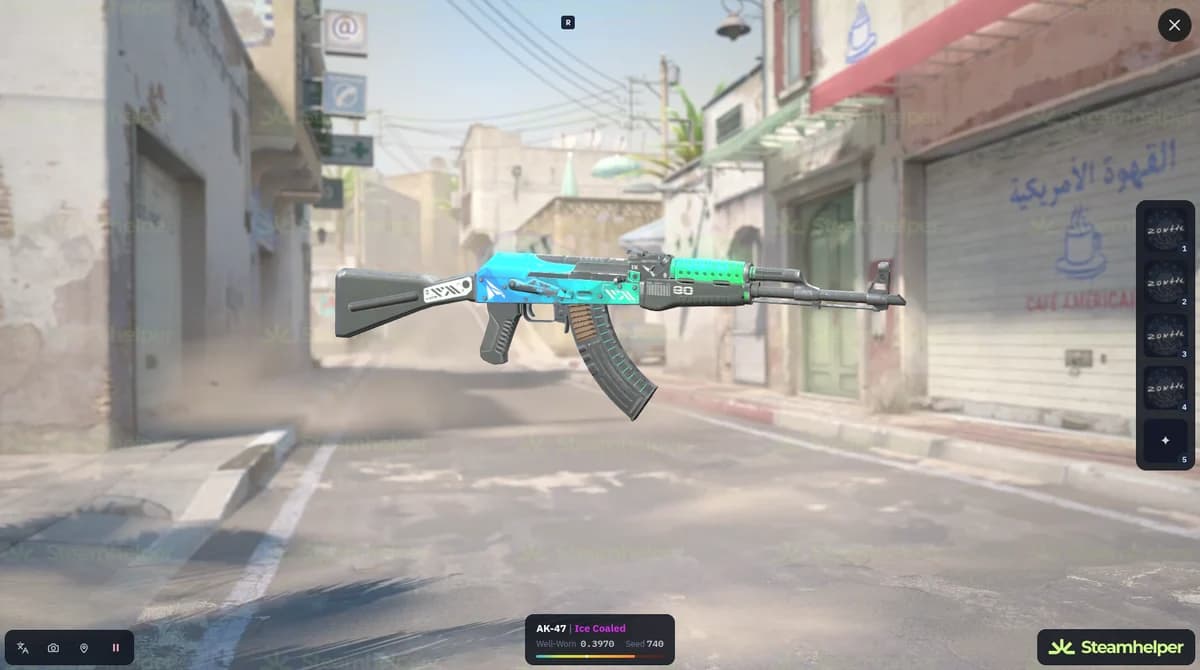
Oglądaj skiny CS2 w 3D.
Otwórz widok 3D broni, noży i rękawic bezpośrednio w przeglądarce — z ofert na rynku, swojego ekwipunku, ofert wymiany i ulubionych. Bez uruchamiania gry.
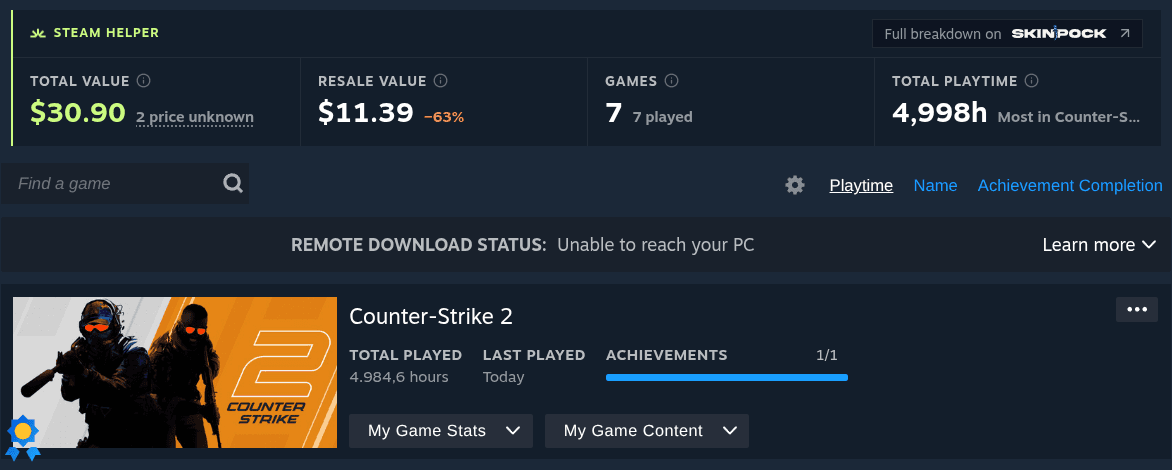
Sprawdź, ile jest warta Twoja biblioteka gier.
Na każdej stronie Gier na Steam SteamHelper dodaje łączną wartość biblioteki w sklepie, szacowaną wartość odsprzedaży, liczbę gier, w które naprawdę grano, oraz łączny czas gry.
Również nowe
Skok do strony ekwipunku
Przejdź do pierwszej, ostatniej lub dowolnej strony dużego ekwipunku.
Ceny przy każdej ofercie
Najniższa cena z innych platform obok przycisku Kup w każdej ofercie CS2.
Ceny w Popularnych przedmiotach
Ceny z innych platform pod przedmiotami z listy Popularne przedmioty na Steam.
Narzędzia do ekwipunku, rynku i wymian Steam bez zbędnego chaosu.
SteamHelper odpowiada na codzienne pytania użytkowników Steam Inventory Helper: ile wart jest ten przedmiot CS2, czy cena na Rynku Steam jest uczciwa i co się stanie, jeśli go sprzedam lub wymienię?
Wartość ekwipunku Steam
Używaj SteamHelper jako pomocnika ekwipunku, aby jednym spojrzeniem oszacować wartość ekwipunku Steam i CS2.
Etykiety cen przedmiotów CS2
Dodawaj etykiety cen Steam do skinów, skrzynek i naklejek CS2.
Informacje o float i wzorze CS2
Sprawdzaj na Steam float skina CS2, jego zużycie, seed malowania i wzór.
Sprzedaż masowa
Przygotuj wiele ofert w kolejce do sprawdzenia, zanim cokolwiek zostanie wystawione.
Automatyczne ustalanie cen
Otrzymuj sugestie cen, które możesz najpierw sprawdzić i dostosować.
Automatyczne przyjmowanie prezentów
Tylko oferty prezentów, w których nie oddajesz żadnych przedmiotów.
Odliczanie blokady wymiany
Sprawdź, kiedy zablokowane przedmioty będzie można ponownie wymieniać.
Porównanie cen na Rynku Steam
Porównuj ceny z Rynku Steam z wybranymi platformami bez chaosu wielu kart.
Wartość oferty wymiany
Użyj widoku pomocnika wymian Steam, aby oszacować obie strony przed zaakceptowaniem lub odrzuceniem oferty.
Ustawienia kontroli
Wyłącz wszystko, czego nie chcesz widzieć na stronach Steam.
Lista obserwowanych
Obserwuj przedmioty, które chcesz kupić lub sprzedać.
Alerty cenowe
Opcjonalne powiadomienia o zmianach obserwowanych cen.
Szukasz alternatywy dla Steam Inventory Helper?
SteamHelper powstał dla graczy, którzy szukają pomocnika ekwipunku Steam, pomocnika ekwipunku CS, rozszerzenia Rynku Steam lub alternatywy dla SIH, ale chcą lżejszego interfejsu i mechanizmów wymagających wcześniejszego zatwierdzenia każdej czynności.
Pomocnik ekwipunku dla Chrome, Edge, Firefox i przeglądarek Chromium
Zainstaluj SteamHelper jako rozszerzenie Steam Inventory Helper w przeglądarkach zgodnych z Chrome lub Firefox. Dodaje wartość ekwipunku, etykiety cen przedmiotów, panele ekwipunku profilu i ustawienia bezpośrednio do stron Steam.
Pomocnik rynku CS2 i CSGO
Porównuj ceny skinów CS2, oferty rynku CSGO, wartości float, stany zużycia i ceny zewnętrznych platform bez opuszczania stron Rynku Społeczności Steam.
Obsługa ekwipunku w stylu SIH
Steam Inventory Helper i narzędzia w stylu SIH są znane z rozbudowanych funkcji handlowych. SteamHelper stawia na lżejszy interfejs, brak dostępu do niezwiązanych witryn, brak ukrytego automatycznego przyjmowania zwykłych wymian oraz sprzedaż wymagającą wcześniejszego sprawdzenia.
Stworzone z myślą o pierwszym pytaniu każdego użytkownika: czy to bezpieczne?
- Bez dostępu do wszystkich odwiedzanych przez Ciebie witryn
- Bez ukrytej automatyzacji i cichego akceptowania wymian
- Główne funkcje nie wymagają klucza API Steam
- Bez reklam i banerów promocyjnych dodawanych do stron Steam
- Automatyzacja jest dobrowolna, domyślnie wyłączona i powiadamia Cię o każdej czynności
Zachowujesz kontrolę nad każdą czynnością.
Zakres uprawnień
Przejrzyste ustawienia domyślne
steamcommunity.com
Wymagane do dodawania pomocy dotyczących ekwipunku i rynku
SteamHelper API
Używane do buforowanych cen i metadanych przedmiotów
Wszystkie witryny
Niewymagane przez podstawowe funkcje rozszerzenia
Automatyczne przyjmowanie prezentów nie jest zwykłym automatycznym akceptowaniem wymian. Działa tylko wtedy, gdy nie oddajesz żadnego przedmiotu i otrzymujesz co najmniej jeden.
Stworzone dla Twoich gier Steam.

CS2
DOSTĘPNE

Dota 2
DOSTĘPNE

TF2
DOSTĘPNE

Rust
DOSTĘPNE

PUBG
DOSTĘPNE

s&box
DOSTĘPNE

Unturned
WKRÓTCE

PAYDAY 2
DOSTĘPNE
Zaufanie to nie odznaka. Liczy się sposób działania produktu.
Wyjaśnianie danych
Ceny zawierają informacje o źródle, dzięki czemu gracze rozumieją przyczyny różnic wartości.
Czytelny Steam
Funkcje są kompaktowe i opcjonalne, a ich projekt nie zmienia Steam w przeładowany panel.
Możliwość sprawdzenia każdej czynności
Sprzedaż masowa tworzy listę, którą sprawdzasz i zatwierdzasz przed wystawieniem. Jedyna automatyzacja — automatyczne przyjmowanie prezentów — dotyczy wyłącznie prezentów i jest domyślnie wyłączona.
Chcę wiedzieć, ile są warte moje przedmioty, bez zmieniania Steam w kokpit.
Wartość ekwipunku
Sprzedaż masowa ma sens tylko wtedy, gdy mogę sprawdzić ostateczną listę przed wystawieniem.
Proces sprzedaży
W każdym rozszerzeniu Steam najpierw sprawdzam uprawnienia i bezpieczeństwo wymian.
Bezpieczeństwo i zaufanie
Najczęściej zadawane pytania
Wszystko, co musisz wiedzieć o SteamHelper.
Zadbaj o większą czytelność Steam
przed kolejną decyzją dotyczącą ekwipunku, rynku lub wymiany.
Dodaj rozszerzenie SteamHelper, otwórz swój ekwipunek Steam i wybierz dokładnie te funkcje ekwipunku, cen i wymian, które chcesz widzieć.